ASUS Vivobook 14 Flip
360-degree Flip hinge
OLED touch display
MIL-STD 810H durability
A laptop hinge quietly determines how a computer feels every day. A smooth, sturdy hinge holds the display at a comfortable viewing angle, survives repeated opening and closing, and supports flexible workflows such as tent or tablet modes. This guide identifies laptops with dependable hinge designs for work, school, travel, and entertainment.
We compared the supplied models by examining hinge design, convertible functionality, display characteristics, processor and memory configurations, connectivity, portability, and practical features. The list includes 360-degree flip designs, conventional laptops with lift-hinge ergonomics, premium OLED convertibles, and more affordable options for everyday computing.
Each review explains the strongest reasons to consider that model and any relevant limitations. The top selections highlight the most compelling combinations of hinge versatility, construction, performance, and display experience. Prices and availability can change, so shoppers should confirm current listings and warranty details before purchasing.

4.6Editor score

4.5Editor score
As an Amazon Associate we earn from qualifying purchases.
The comparison below highlights hinge style, display format, core performance, and practical portability across ten laptops suited to different needs and budgets.


The Lenovo Yoga 7i 2-in-1 stands out as the most complete option in this guide for buyers who want a hinge that does more than hold a traditional laptop screen upright. Its 360-degree flip-and-fold design supports laptop, tablet, tent, and stand modes, giving the 16-inch display several useful positions. The supplied rating of 4.6 also places it among the strongest-reviewed products listed, although ratings can change over time.
We may earn a commission when you buy through this link, at no additional cost to you.
Its 16-inch 1920 x 1200 IPS touchscreen is one of the clearest and most capable displays in the group. Wide viewing angles are useful when the computer is folded into tent or stand mode, while the touchscreen makes browsing, drawing, and presenting more natural. The Core Ultra 7 155U provides 12 cores and 14 threads with Turbo Boost support, giving it more headroom for multitasking, video editing, and demanding applications than the entry-level alternatives.
Connectivity is another strength. The configuration includes Wi-Fi 6E, a Gigabit Ethernet port, two USB Type-A ports, two USB Type-C ports, HDMI, a microSD card reader, and a headphone/microphone combination jack. Lenovo Transition can adjust applications when the user changes modes, improving the practical value of the hinge. The main drawback is the large footprint of a 16-inch convertible, which makes it less convenient to carry than a compact 14-inch model.
This is the recommendation for students, professionals, and households that want one machine to replace several device types. It is particularly attractive for note-taking, presentations, media viewing, and regular travel between a desk, couch, and meeting space. The hinge does not eliminate the need for reasonable care, but the multi-position design makes this one of the most compelling laptops with good hinges for flexible everyday use.
The defining feature is the ability to rotate the display through 360 degrees. Laptop mode supports conventional typing, while tent mode can place the keyboard out of view for presentations or watching. Tablet mode suits browsing and touch interaction, and stand mode creates a compact screen for media viewing. Lenovo Transition helps apps respond when the configuration changes.
The 2K IPS panel offers enough detail for documents, creative work, and entertainment, while the Core Ultra 7 155U supplies solid multitasking performance. This combination makes the Yoga 7i suitable for users who need a flexible display without settling for a low-power processor.
We may earn a commission when you buy through this link, at no additional cost to you.
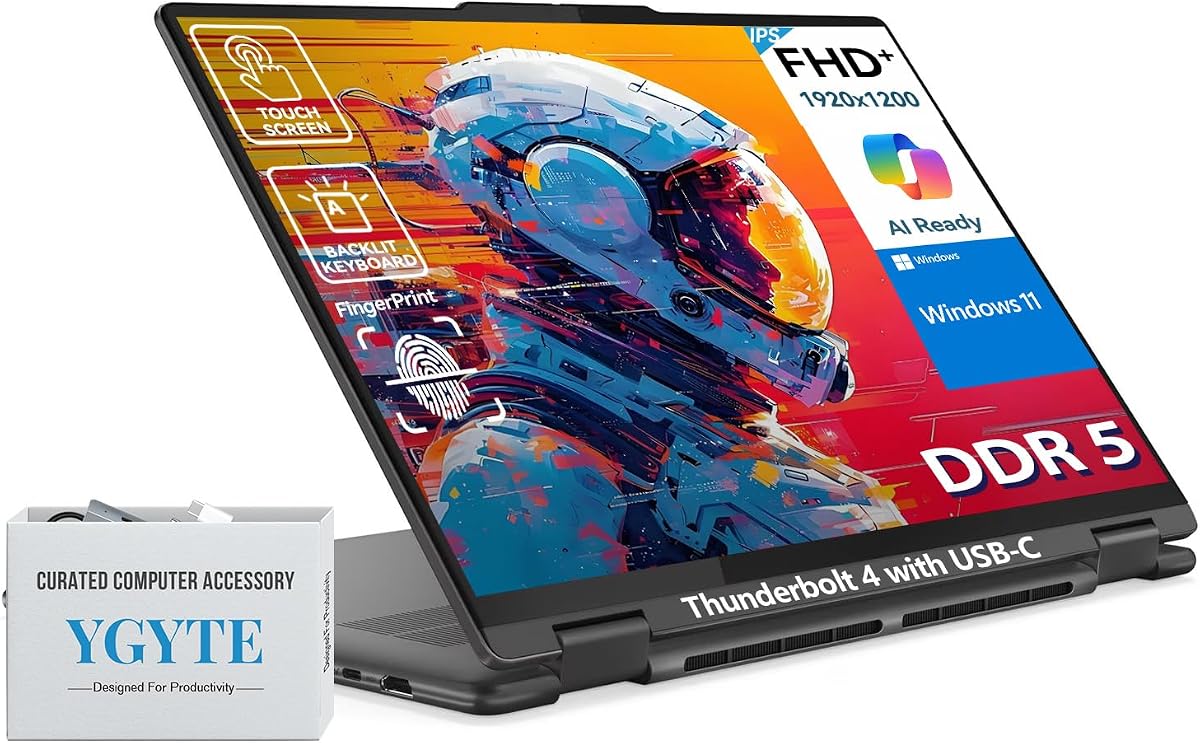
This Yoga 7i configuration is built around the same basic appeal as a premium convertible: a flexible 360-degree hinge, a large touchscreen, and a durable metal chassis. Its 16-inch FHD+ IPS panel has slim bezels, reduced-blue-light features, and enough resolution for productivity and entertainment. No customer rating was supplied in the product data, so its rating is shown as zero rather than assigning an unsupported score.
We may earn a commission when you buy through this link, at no additional cost to you.
The Core Ultra 7-155U includes 12 cores, 14 threads, and an AI Boost NPU, while 16GB of LPDDR5x memory is well suited to demanding multitasking. A 512GB SSD provides quick file access and a practical capacity for a large application and document library. The listed combination of wide viewing angles, integrated graphics, and efficient cooling makes the laptop suitable for business users, students, and creators who regularly rotate between working orientations.
The hinge is supported by a design intended for repeated folding into tablet, tent, and stand positions. Beyond the hinge, this model offers a backlit numeric keypad, fingerprint sensor, Thunderbolt USB-C with charging and DisplayPort, Wi-Fi 6E, Bluetooth 5.3, an IR camera, and Dolby Audio-tuned stereo speakers. A long-lasting battery and rapid charging add convenience, although the 16-inch format still requires more space than a smaller convertible.
Buyers seeking business features and refined construction will find this model more compelling than the entry-level alternatives. The included YGYTE Accessory Suite adds convenience, though shoppers should examine the package closely to understand what it contains. This is a strong premium recommendation for anyone whose work benefits from switching display positions, particularly in offices, classrooms, or travel settings.
The metal chassis gives the Yoga 7i a more substantial feel, while the flexible 360-degree hinge allows four working orientations. That construction is particularly relevant for buyers comparing premium convertibles because it combines a polished appearance with the practical benefits of a folding display.
Windows 11 Pro, a fingerprint reader, Thunderbolt connectivity, a numeric keypad, and a 1080p IR camera make this configuration especially attractive for office work. The Core Ultra 7 processor and LPDDR5x memory provide a capable platform for multitasking and heavier applications.
We may earn a commission when you buy through this link, at no additional cost to you.
The HP OmniBook 3 17.3-inch takes a conventional approach to the hinge, making it a practical choice for buyers who prioritize a stable everyday laptop rather than convertible flexibility. Its 17.3-inch FHD IPS display offers 178-degree wide viewing angles, which helps when working beside a window or sharing content across a desk. The product has a supplied rating of 4.5.
We may earn a commission when you buy through this link, at no additional cost to you.
Its AMD Ryzen 3 30 processor is designed for routine productivity, casual gaming, streaming, and photo editing. Integrated Radeon 610M graphics keep the system suitable for entertainment without suggesting specialized gaming performance. The 8GB of LPDDR5 memory provides efficient operation for browsing and office work, while the 512GB PCIe NVMe SSD offers a helpful balance of capacity and responsiveness.
HP emphasizes up to 14 hours and 15 minutes of battery life, and Fast Charge can restore the battery from zero to 50 percent in approximately 45 minutes under specified conditions. An FHD camera with HDR auto-switch supports video calls in uneven light, while Advanced Personal Mode can reduce background noise during conversations. These details make the laptop especially useful for students and remote workers.
The tradeoff is its large display and 8GB memory configuration. This is not the most portable model, nor is it designed for intensive professional workloads. For home users, students, and office professionals who want a roomy FHD screen, generous storage, and practical battery features, however, the OmniBook 3 provides a balanced and approachable package.
The 17.3-inch FHD IPS display provides ample room for spreadsheets, browser windows, documents, and video calls. Wide viewing angles make it easier to maintain a clear image when seated at an angle, improving versatility without requiring a convertible hinge.
Fast charging, an FHD camera, and automatic call noise reduction suit students and remote workers. Windows 11 and the Copilot Key simplify access to common tasks, while Wi-Fi 6 and Bluetooth 5.4 support modern wireless accessories.
We may earn a commission when you buy through this link, at no additional cost to you.
The ASUS Vivobook 14 Flip is the most feature-forward premium convertible in this collection. Its 360-degree Flip hinge supports laptop, tablet, stand, and tent modes, allowing the 14-inch OLED touchscreen to adapt to work, presentations, creation, and entertainment. The product data does not provide a customer rating, so the numeric rating field remains at zero rather than presenting an unverified score.
We may earn a commission when you buy through this link, at no additional cost to you.
The display is a major attraction. A 16:10 WUXGA OLED touchscreen, 85 percent screen-to-body ratio, and vivid color make it well suited to media editing, creative work, and viewing. Inside, the Intel Core Ultra 9 386H is described as delivering AI-ready performance with up to 50 NPU TOPS, while 32GB of memory and a 1TB SSD provide generous capacity for advanced multitasking.
The 70Wh battery is listed as supporting up to 38 hours, and fast charging can add up to 60 percent in 49 minutes under specified test conditions. Real-world battery life varies with workload, settings, and usage, so those figures should be treated as laboratory-oriented claims. Dolby Atmos-developed 360-degree adaptive audio changes with the laptop's orientation, adding a useful touch to the convertible design.
Wi-Fi 7, Windows Hello facial recognition, and Microsoft Pluton protection strengthen the feature set, while USB-A, USB-C, Thunderbolt 4, HDMI 2.1, audio, and microSD connectivity cover most accessory needs. MIL-STD 810H durability adds reassurance, although it does not mean the device is immune to damage. This is a compelling premium choice for buyers who value an excellent screen, flexible hinge, and high-end internals.
Flip Smart is designed to adapt the display and software to laptop, tablet, stand, and tent modes. This makes the hinge more than a visual design element: it changes how the computer can be used for typing, drawing, presenting, or watching media.
The OLED touchscreen provides vivid contrast and an immersive 16:10 canvas. Paired with the Core Ultra 9 processor, 32GB of memory, and 1TB SSD, it supports users who expect strong performance for demanding creative and productivity workloads.
We may earn a commission when you buy through this link, at no additional cost to you.
The HP Envy x360 15-inch combines a flexible convertible hinge with a balanced set of everyday specifications. Its 15-inch edge-to-edge FHD touchscreen supports both productive typing and more flexible media use, while Intel Iris Xe graphics provide a capable platform for content creation, entertainment, and light gaming. Its supplied rating is 4.4.
We may earn a commission when you buy through this link, at no additional cost to you.
The 12th-generation Intel Core i7-1260P processor distributes performance according to the workload, helping with demanding multitasking and longer creative sessions. Its 16GB of RAM offers comfortable headroom for browser use, office applications, and several apps operating simultaneously. A 1TB SSD provides ample storage and fast access, making this configuration particularly attractive to users who keep large project or media libraries.
The convertible hinge expands the usable forms of the device, allowing tent and stand positioning for watching, presenting, or touch interaction. HP Fast Charge can move the battery from zero to 50 percent in approximately 30 minutes, a useful feature when the user needs a quick top-up. Its primary limitation is that the processor generation is less current than the Core Ultra options elsewhere in the guide.
This Envy x360 is a strong fit for students, mobile professionals, and families seeking a capable touchscreen without an oversized display. It provides a good balance between performance, storage, flexibility, and familiar Windows 11 operation. For buyers prioritizing a long-established convertible format and a large internal SSD, it remains an attractive option.
The 360-degree hinge lets the display move out of the conventional typing position, making tent and stand modes useful for streaming, group presentations, and casual touch use. It preserves a larger screen than many compact convertibles without reaching the footprint of a 17-inch model.
The combination of 16GB RAM and a 1TB SSD gives the model useful multitasking headroom and abundant file capacity. Intel Iris Xe graphics also make it a practical option for general creative work and entertainment.
We may earn a commission when you buy through this link, at no additional cost to you.
The Dell 15.6-inch DC15250 offers a different interpretation of a good hinge. Its lifted hinges raise the keyboard to a more ergonomic typing angle rather than allowing the 360-degree transformations seen on convertibles. That makes it a comfortable choice for long typing sessions and a simpler option for users who never need tablet mode. The supplied rating is 4.3.
We may earn a commission when you buy through this link, at no additional cost to you.
Its Intel Core i5-1334U processor is aimed at everyday computing, with the emphasis on efficiency and dependable productivity. The FHD display and Dell ComfortView software are intended to provide comfortable viewing over extended periods by reducing harmful blue-light emissions. Dell also includes Express Charge support, although exact charging times depend on the adapter and operating conditions.
One of the most useful physical features is the roomy keyboard, separate numeric keypad, and calculator hotkey. These details are valuable for students, bookkeepers, and office workers who enter numbers regularly. A one-year onsite service plan adds another layer of convenience because eligible hardware issues may be addressed at the user's home or office when remote resolution is unavailable.
The limitation is that the product data supplies less detail about memory, storage, and connectivity than some competing listings. Buyers should verify those specifications before purchase, especially if the laptop will handle specialized software or a large local file library. Within those constraints, the DC15250 is a sensible ergonomic option for everyday productivity.
Lifting the back of the keyboard changes the angle at which the user's wrists meet the desk. That can make long typing sessions feel more comfortable, especially when compared with a laptop whose base remains completely flat.
The separate numeric keypad, calculator hotkey, ComfortView display software, and onsite service align with the needs of frequent computer users. The Core i5 processor targets routine productivity rather than high-end graphics workloads.
We may earn a commission when you buy through this link, at no additional cost to you.
The HP 17.3-inch Core i5 model emphasizes a roomy workspace, familiar conventional form, and useful everyday specifications. Its FHD IPS display provides 178-degree wide viewing angles, making it practical for office work, streaming, photo viewing, and households that prefer a larger screen. The supplied rating is 4.3.
We may earn a commission when you buy through this link, at no additional cost to you.
A 13th-generation Intel Core i5-1334U processor supports multitasking, while Intel Iris Xe graphics bring improved visuals to creation, entertainment, and casual gaming. The 16GB of DDR4 RAM provides adequate capacity for many productivity applications, and the 512GB PCIe NVMe SSD delivers much faster operation than a traditional hard drive.
The True Vision HD camera supports video communication, while the physical camera shutter offers direct control over privacy without relying only on software. Windows 11 Home provides a modern interface, and the 17.3-inch display is large enough for multiple windows, side-by-side research, or comfortable spreadsheet work. The principal concern is portability because the wide chassis is less convenient to carry than a 14-inch laptop.
This model makes sense for students who prefer a large study screen, families using a shared household computer, and office users who want a numeric-heavy workspace without paying for a premium convertible. Its hinge design favors stability and traditional use rather than multiple orientations. It is a sensible large-screen choice when workspace and everyday performance matter more than extreme portability.
A 17.3-inch panel offers substantially more working area than a compact notebook. That makes side-by-side documents, large spreadsheets, and media playback easier to manage while keeping the hinge in a stable conventional position.
The 16GB of memory supports routine multitasking, while the 512GB PCIe NVMe SSD balances capacity with quick response. The physical camera shutter adds a straightforward privacy feature for shared environments.
We may earn a commission when you buy through this link, at no additional cost to you.
The HP 14-inch N150 is the most clearly budget-focused recommendation in the guide, but its conventional hinge and portable chassis serve basic users effectively. The laptop weighs just 3.24 pounds and measures 0.71 inches thick, making it easy to carry between home, school, or an office. Its supplied rating is 4.5.
We may earn a commission when you buy through this link, at no additional cost to you.
The Intel N150 includes four cores and four threads with speeds up to 4.4 GHz. Combined with 4GB of DDR5 memory and a 128GB SSD, it is best suited to web browsing, document work, communication, online learning, and light multitasking. The product data also mentions 1TB of cloud storage, which can supplement limited local capacity for compatible files and applications.
Its 14-inch non-touch display has 250 nits of brightness and an anti-glare coating, making it easier to use around bright rooms than a glossy panel. USB 3.0 Type-C, USB 3.0 Type-A, HDMI, a headphone/microphone jack, Wi-Fi, and Bluetooth provide a practical selection of connections. One year of Microsoft 365 is included.
The limitations are important for anyone comparing this model with more powerful laptops. Four gigabytes of RAM can become restrictive with many browser tabs and applications, while 128GB of local storage leaves limited room for large media collections. For writing, schoolwork, browsing, and light office use, though, this is a compellingly portable and affordable option with a practical hinge.
A 3.24-pound weight and 0.71-inch profile reduce the strain of carrying a computer throughout the day. The compact 14-inch format is a better fit for mobile study than the larger 17-inch alternatives in this guide.
The Intel N150 and 4GB memory prioritize affordability and efficiency over intensive multitasking. Users should keep installed applications and open tasks modest, using cloud storage or an external drive when file capacity becomes an issue.
We may earn a commission when you buy through this link, at no additional cost to you.
The HP 17-inch Ryzen 5 is designed around a large working area, business-oriented input features, and a configuration suitable for general office productivity. Its 17.3-inch FHD anti-glare display provides room for documents, spreadsheets, browser research, and video calls without the reflective treatment found on many glossy panels. Its supplied rating is 4.5.
We may earn a commission when you buy through this link, at no additional cost to you.
The listing identifies an AMD Ryzen 5 processor, 16GB of RAM, and a 512GB SSD. Together, these components provide a more comfortable multitasking foundation than the entry-level 14-inch model in this guide. Windows 11 and Office 365 for the Web support common productivity tasks, including document, presentation, and spreadsheet work, while Copilot features can help organize information and draft content.
The full-size keyboard includes a 10-key numeric keypad, which is especially useful for accounting, inventory, data entry, and office work. A 720p Wide Vision camera and digital microphones support video communication, while long battery life and HP Fast Charge help manage time away from an outlet. The slim-bezel design makes the large panel look somewhat more contemporary.
Buyers should recognize the portability compromise. A 17.3-inch chassis is best suited to a home desk, office, or classroom where it can remain set up for long periods. The conventional hinge prioritizes a stable laptop position, and no convertible flexibility is claimed. For business and school users who value a numeric keypad, large display, and 16GB of memory, this is a well-matched everyday machine.
The large FHD anti-glare panel is useful for sustained office work because it provides generous space and reduces reflections. It is a practical fit for users who spend much of the day at a fixed desk or in a classroom.
The numeric keypad supports data-heavy tasks, while Office 365 for the Web and Copilot assistance simplify common productivity workflows. A 720p camera, digital microphones, Fast Charge, and long battery life round out the business focus.
We may earn a commission when you buy through this link, at no additional cost to you.
The 15.6-inch Pentium Gold laptop is a basic desktop replacement built around the supplied 5.0 rating, a 12GB memory configuration, and a full HD IPS display. Its conventional hinge keeps the screen in a stable laptop position, while the 15.6-inch panel offers enough workspace for browsing, online classes, spreadsheets, and video conferencing.
We may earn a commission when you buy through this link, at no additional cost to you.
The Pentium Gold 6500Y operates at speeds up to 3.4 GHz and is intended for everyday productivity such as web browsing, document editing, remote learning, and routine office tasks. Its 12GB of RAM is unusually generous for this entry-level processor class and helps when several standard applications are open. The 128GB SSD supports fast startup and efficient file access, although capacity is limited.
Storage can be expanded using the built-in M.2 SSD slot, with support stated for drives up to 1TB. Connectivity includes USB-C, HDMI, USB 3.2, USB 2.0, Wi-Fi 5, Bluetooth 5.0, and a TF card reader. The FHD IPS display uses 1920 x 1080 resolution and wide viewing angles, providing a clear and comfortable image for extended work.
This laptop is best for students, home-office users, and buyers who need a straightforward machine for web and document tasks. Its lightweight design also supports travel between locations. The main limitations are the modest starting storage and entry-level processor, making it a better fit for light productivity than intensive creative software or demanding professional applications.
The 12GB RAM configuration provides useful breathing room for browser tabs, messaging, office applications, and online learning. It does not make the Pentium Gold processor a high-end platform, but it helps the system remain comfortable across common productivity tasks.
The M.2 slot supports storage expansion up to 1TB, reducing the long-term impact of the small initial drive. USB-C, HDMI, multiple USB ports, Wi-Fi 5, Bluetooth 5.0, and TF card support cover many everyday accessory needs.
We may earn a commission when you buy through this link, at no additional cost to you.
The right hinge depends on how the computer will be used. Convertible users should examine rotation range and mode support, while conventional-laptop shoppers should consider stability, typing angle, build quality, and the compromises created by screen size or portability.
Choose conversion when presentations, drawing, media viewing, or compact entertainment modes matter. Choose a conventional or lift hinge when typing, large workspaces, and straightforward portability are the priorities.
Match the laptop to your mobility pattern. Frequent travelers should favor smaller models, while desk-based users can prioritize workspace and easier numeric input.
Look for wide viewing angles on convertible models and consider matte or anti-glare finishes if the laptop will be used in bright rooms.
Choose at least 8GB for regular multitasking, and favor 16GB or more for demanding applications. Match processor power to the software you actually use.
Prioritize enough local storage for your applications and important files. Verify whether the M.2 slot is accessible and what maximum capacity the manufacturer supports.
List the devices you need to connect before choosing. Prioritize USB-C, HDMI, and wireless standards that match your existing accessories.
Treat maximum battery claims as comparative guidance rather than a guarantee. For travel, fast charging and an efficient processor can be as important as rated battery life.
Check support terms and handle convertible laptops with two hands. Strong specifications cannot compensate for a hinge that has been bent or physically damaged.
Open a convertible with two hands when possible, especially near an edge or while the device is elevated. Hold the base rather than pulling on the display corners, and avoid twisting the panel after it reaches its intended angle. A smooth rotation is normal for a well-designed hinge, but resistance, scraping, or a display that will not remain stable indicates that the device should not be forced.
Use the correct mode for the task. Keep the keyboard engaged for prolonged typing, use tent or stand modes for presentations and viewing, and use tablet mode for touch interaction. Place the computer on a stable, flat surface before rotating it. Avoid placing pressure on the screen while the device is folded, and keep cables and pens away from the hinge gap where they could create leverage or become trapped.
For conventional and lift-hinge laptops, open the display vertically and avoid pushing against the upper bezel. Clean the hinge and surrounding areas with a soft dry cloth, and keep liquids away from the mechanism. Periodically check for loose screws, visible gaps, or unusual resistance. If a hinge becomes stiff, cracked, or detached, stop folding the unit and contact the manufacturer or an authorized service provider rather than attempting an improvised repair.
A good hinge supports a stable viewing angle, opens smoothly, resists unwanted movement, and withstands repeated use. For a convertible, it should also rotate smoothly through supported modes without pulling the panel out of alignment. Build quality, internal reinforcement, and careful user handling all influence long-term durability.
Modern 360-degree hinges are designed for frequent rotation and can last well when treated normally. They require more care than a conventional hinge because the screen, keyboard, and rotating joint move together. Avoid lifting the device by the display, twisting the panel, or applying pressure while it is folded.
A convertible is worthwhile if you often present, draw, watch media, or want a larger touchscreen in a compact form. It may be unnecessary if you primarily type at a desk or value the simplicity of a conventional design. Compare weight, battery life, and keyboard behavior in the intended modes before deciding.
A lift hinge can reduce wrist strain by raising the keyboard to a more natural angle. The benefit is most noticeable during extended typing sessions. It does not offer the display positions of a convertible, so the right choice depends on whether ergonomic typing or flexible screen positioning matters more.
A larger panel can create more leverage because of its size and weight, although well-engineered hinges are designed for the loads associated with their products. Portability, handling, and build quality still matter. Choosing the lightest model that meets your workspace needs can reduce strain on both the hinge and the user.
Common warning signs include cracking, excessive looseness, a screen that drops out of position, scraping during rotation, and visible separation around the hinge assembly. Stop repeatedly flexing the device and contact the manufacturer or an authorized service provider. Continuing to force the mechanism can worsen the damage or affect the display.
OLED is valuable when vivid color, deep contrast, and strong viewing performance matter for media or creative work. It is not essential for every user, and other factors such as brightness, viewing angles, battery behavior, and price may matter more. An IPS touchscreen can remain a solid choice for office work and general productivity.
The hinge should match your workflow, but processor, memory, storage, display, and portability also shape daily satisfaction. Aim for adequate memory for your applications, sufficient local storage, and a screen size you can carry comfortably. For heavier work, prioritize a more capable processor and graphics rather than spending the entire budget on conversion features.
The Lenovo Yoga 7i 2-in-1 is the most balanced recommendation for buyers who want a proven 4.6-rated model with four display modes, a sharp 16-inch 2K touchscreen, and strong connectivity. The ASUS Vivobook 14 Flip stands out as the premium choice because it combines an OLED touch display, a 360-degree Flip hinge, high-end memory and storage, Wi-Fi 7, and MIL-STD 810H durability.
For buyers who do not need convertible flexibility, prioritize the form that matches the workspace. The HP 14-inch N150 is the lightest and most budget-conscious option, while the Dell 15.6-inch DC15250 offers the notable ergonomic benefit of lifted hinges. The HP 17.3-inch models provide more screen area, and the Pentium Gold configuration supplies 12GB of memory for basic productivity.
Ultimately, the best laptop with good hinges is the one whose movement, screen size, and everyday performance suit your specific routine. Confirm current product details, ratings, warranty terms, and prices before ordering, since configurations and costs can change. Most importantly, choose a display size and hinge style you will genuinely use rather than paying for flexibility that adds bulk without practical value.