
Heat Set Insert Tool 7X Soldering Tips
4.8Editor score
Seven brass insert tips
900M T18 adapter included
Clear storage case
Our heat set insert tool guide compares 10 kits for 3D printing, covering power, temperature control, tip sets, insert capacity, and ease of use for makers.
Heat set insert tools install durable brass threaded inserts into plastic parts using controlled heat. A useful system combines accurate temperature control, correctly sized tips, dependable heating, and enough clearance for the parts you build. These features help create stronger joints than relying on printed threads alone.
The products in this guide range from compact soldering-iron-based kits to vertical press systems with larger working areas. We compared their stated power, temperature ranges, included tip sizes, insert quantities, material compatibility, storage features, and setup requirements, while separating the most versatile options from budget-focused kits.
Each review explains the strongest reasons to consider a particular heat set insert tool, along with its limitations and ideal user. Ratings and product details reflect the supplied listings, while availability and current listing information can change, so shoppers should confirm specifications and accessories before purchasing.
4.8Editor score

4.9Editor score

4.5Editor score
This side-by-side comparison highlights the differences in heating capacity, temperature control, tip coverage, included hardware, and working space across ten heat set insert tool options.


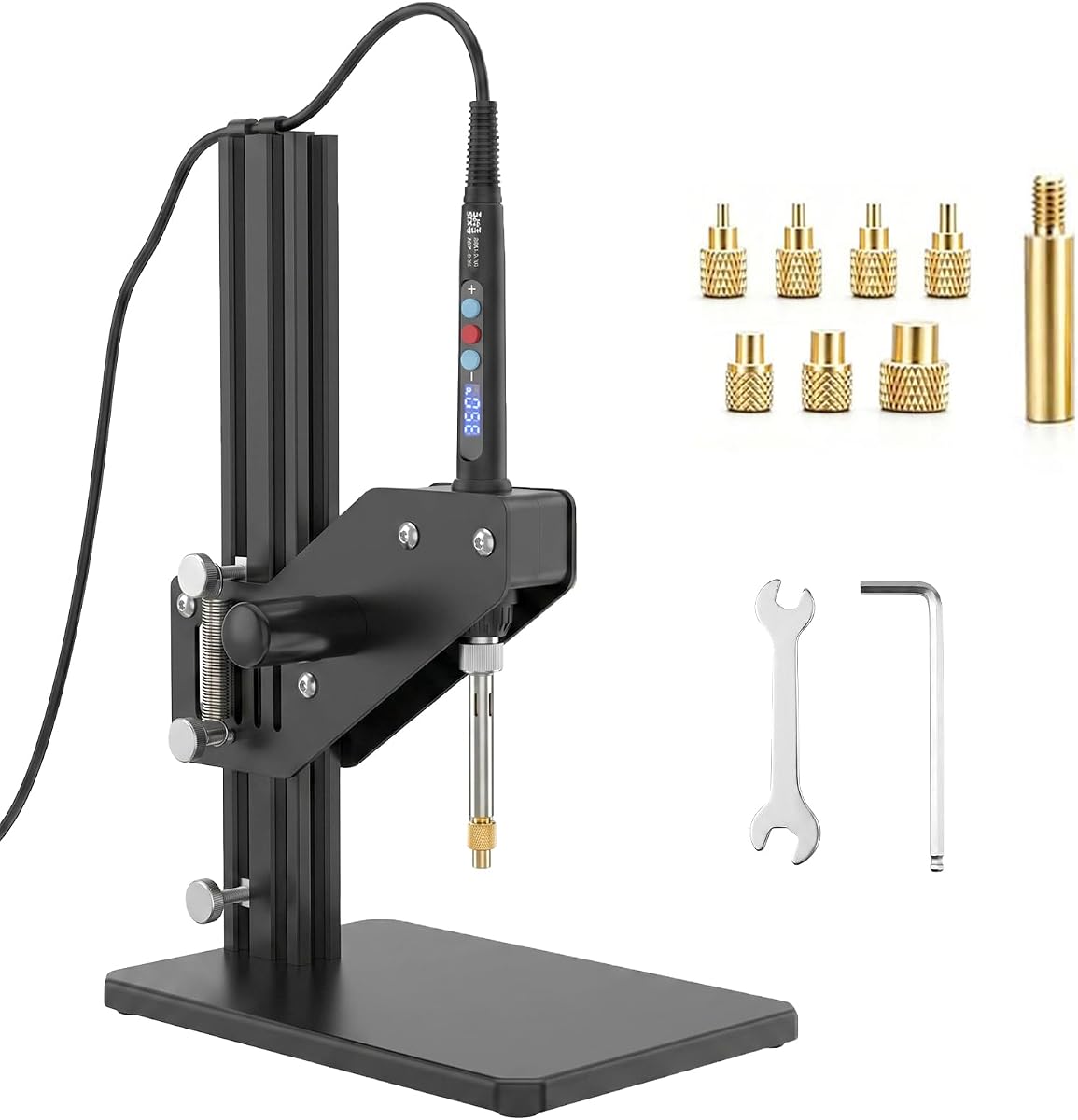
The Vertical Heat Set Insert Tool Press is a dedicated station for installing threaded inserts into plastic parts, and it carries a 4.5 rating. Its distinguishing advantage is a stated working height of up to 210 millimeters, allowing it to handle taller models than compact tools designed for small components. The vertical format also makes the pressing direction visually consistent.
We may earn a commission when you buy through this link, at no additional cost to you.
Most of the listed components are aluminum, which the manufacturer describes as lighter and stronger. Heat comes from a 60-watt digital soldering iron accepting 110 to 230 volts, with a temperature range of 180 to 500 degrees Celsius. Switchable Celsius and Fahrenheit displays, detachable tips, and a large box of 380 threaded inserts make this a broadly equipped system for multi-size projects.
The trade-offs are its larger physical footprint and the greater need for alignment when using a vertical press. It offers less freedom for awkwardly shaped parts than a handheld soldering iron because the working area is designed around vertical insertion. Prospective buyers should also confirm that their models fit within the stated height allowance and that their insert sizes fall within the included M2 through M8 range.
This press is best suited to makers who routinely build tall plastic enclosures, housings, and larger 3D-printed assemblies. It is also a logical premium option for workshops that value a repeatable pressing arrangement and a broad insert inventory. For those needs, the additional structure is more useful than the simplicity of a compact pen-style iron.
The stated 210-millimeter insertion height is the key practical advantage for large prints. It reduces the need to angle a handheld iron and helps keep the tip aligned with the insert while the surrounding plastic is heated.
Detachable M2, M2.5, M3, M4, M5, M6 quarter-inch, and M8 tips support common fastener sizes. The included 380 inserts mean the station is ready for a substantial number of installation jobs.
We may earn a commission when you buy through this link, at no additional cost to you.
The KADRICK 80W Soldering Iron Heat Insert Tool combines a compact digital iron with a generous collection of brass inserts, giving it a 4.7 rating. Its most appealing feature is the broad package: seven tips, 520 lead-free brass inserts, fast heating, an LED display, and an anti-scald grip are all included from the outset.
We may earn a commission when you buy through this link, at no additional cost to you.
The iron is specified to reach operating conditions in no more than 30 seconds, making it practical for repeated prototype work. Switch-based temperature control provides direct operation, while the included M2 through M8 tips allow the same tool to handle several common insert diameters. Listed compatibility covers PLA, ABS, and Nylon, along with the broader functional-prototype use case.
This is still a handheld soldering iron rather than a vertical pressing machine. It therefore depends on steady placement over the insert, and users working on large or deeply recessed components may prefer a guided press. The product information also emphasizes these three filament types, so parts made from other thermoplastics should be tested carefully with a lower starting temperature.
The KADRICK kit is a strong choice for a new maker who wants enough inserts and tips to complete many projects without assembling a separate parts list. Its rapid heating, digital readout, complete sizing range, and included warranty make it more versatile than a minimal iron-and-tip package. It is especially attractive for prototypes requiring recurring assembly and disassembly.
Seven brass tips and 520 lead-free brass inserts cover common project requirements from the outset. This reduces the chance of discovering midway through a build that a necessary tip or insert size is missing.
A stated 30-second warm-up supports a quicker workflow when several printed parts need inserts. The digital display and controlled switches also help users repeat the same setup more consistently.
We may earn a commission when you buy through this link, at no additional cost to you.
The 60W Soldering Iron Insert Kit is a conventional soldering-iron solution that includes 380 threaded inserts and seven detachable tips. Its 4.5 rating reflects a balanced package aimed at both 3D printing and general plastic assembly, with particularly useful guidance for selecting temperature settings by material.
We may earn a commission when you buy through this link, at no additional cost to you.
The digital iron automatically converts between 110 and 220 volts, which makes it more accommodating for different electrical environments. Users can hold the indicated control to adjust temperature from 180 to 500 degrees Celsius and switch between Celsius and Fahrenheit. The included silicone protective cover adds handling protection, while the insert collection provides a strong starting inventory.
Installation success depends on choosing an appropriate temperature. The listing recommends 180 to 220 degrees Celsius for PLA, 210 to 230 for PETG, 230 to 250 for ABS, and 280 to 350 for Nylon or PC. These figures are useful starting ranges, but hole diameter, layer characteristics, and the specific insert can still influence the final result.
This kit suits makers who want a versatile soldering iron, threaded inserts, and installation tips in one organized purchase. It is less specialized than the vertical stations because it lacks a fixed pressing frame, but the automatic voltage conversion, clear material recommendations, and large selection make it a practical general-purpose option for both printed parts and plastic components.
Published temperature ranges for PLA, PETG, ABS, Nylon, and PC give beginners a sensible starting point. These recommendations make it easier to reduce heat gradually while protecting the surrounding plastic.
Automatic conversion from 110 to 220 volts simplifies use across different locations. The digital controls and dual-unit display also make it easier to maintain a repeatable temperature setting.
We may earn a commission when you buy through this link, at no additional cost to you.
The Vertical 90W Heat Set Tool combines a guided vertical press with a relatively powerful digital iron, earning a 4.5 rating. Its 95-percent preassembled design is a major convenience, as only a few components need attachment before the station can be used. A built-in slide-out drawer also separates the tool from a simple collection of loose accessories.
We may earn a commission when you buy through this link, at no additional cost to you.
The 90-watt iron is specified for fast heating and quick recovery, with a real-time display covering 180 to 500 degrees Celsius. Tip changes use a threaded adapter design, allowing the user to unscrew one tip head and install another without removing the entire iron tip. The included M2-to-M8 range and stated support for PLA, PETG, ABS, PPS, and PP make it relevant to a broad mix of projects.
The product still requires minimal setup and occupies more room than a pen-style iron. Its vertical approach may be less convenient for irregular parts that cannot be positioned squarely on the platform. Users should also avoid treating the advertised power figure as a substitute for selecting the correct temperature for a particular plastic.
This station is well suited to beginners who want a guided setup and to experienced makers who repeat similar installations. The combination of high power, real-time feedback, quick tip changes, and built-in storage reduces friction at the bench, while the drawer helps keep small screws, tips, and inserts close at hand.
The press frame provides a consistent path for heating each insert. That makes it easier for a new user to keep the tip centered and reduces the amount of improvisation required for repeated parts.
The integrated drawer keeps tips, screws, and small components organized. This is particularly useful when switching among insert sizes and losing tiny hardware would interrupt the workflow.
We may earn a commission when you buy through this link, at no additional cost to you.
The 60W Digital Heat Set Iron is a dual-purpose soldering tool that can install M2 through M8 heat-set inserts and handle ordinary soldering tasks. Its 4.5 rating reflects a practical combination of seven insert tips, five quarter-inch soldering tips, a readable digital display, and a simple Celsius-to-Fahrenheit conversion control.
We may earn a commission when you buy through this link, at no additional cost to you.
The 60-watt heating element is intended to reduce waiting during soldering applications, while the display allows the user to monitor the working temperature. Conversion requires pressing the reb buttons twice, which is not as direct as a dedicated unit button but keeps the primary controls straightforward. Its pen-style construction also supports use in electronics, jewelry, and general repair work.
The principal limitation is that threaded inserts are not listed among the included accessories. Buyers will need to obtain compatible inserts separately, and the absence of a listed stand or holder may make a separate support useful. It also lacks the guided alignment offered by a vertical press, so steady placement is the user's responsibility.
This is a sensible choice for a maker who wants one iron for both heat-set inserts and conventional electronics work. The combination of tip sizes and digital temperature information gives it broader utility than a dedicated insert installer, particularly for users who already own a collection of common threaded inserts.
The five soldering tips make the tool useful beyond plastic assembly. That versatility is useful for wiring, jewelry, and small repairs while still leaving seven heat-set tips available for threaded inserts.
The digital display provides a clear numerical reading during heating and use. Switching units is possible through the reb-button procedure, allowing the tool to match a maker's preferred temperature notation.
We may earn a commission when you buy through this link, at no additional cost to you.
The 80W LCD Heat Set Tool is a portable digital soldering iron with heat-set insert capabilities, a high-definition display, and a 4.2 rating. It includes five interchangeable soldering tips, seven insert tips for M2 through M8, and a stand with sponge, making it a more complete electronics-oriented package than a bare iron.
We may earn a commission when you buy through this link, at no additional cost to you.
The ceramic heating core is specified to reach operating temperature in 20 seconds and maintain a stable output. Adjustable temperatures span 180 to 500 degrees Celsius, with automatic shutdown at the selected value and reheating when the temperature falls. A readable LCD, on-off switch, and insulated silicone sleeve support controlled, comfortable operation.
This listing has the lowest rating among the ten products, although the supplied information does not identify a specific defect. The absence of threaded inserts is another practical limitation, so users must source them separately. Although the tool is portable, users should still use suitable ventilation and avoid directing heat toward flammable objects.
The kit is aimed at electronics hobbyists, students, and repair users who also need threaded inserts. Its exact temperature display, quick heat response, and included stand make it appealing for bench work, while the 16-in-1 accessory assortment helps cover common soldering and insert-installation tasks.
The stated 80-watt ceramic element is designed to heat quickly and recover output as the temperature changes. Automatic reheating is helpful during a succession of similarly sized insert installations.
Ventilation openings in both the tip and pipe improve heat dissipation, while the insulated sleeve reduces direct contact with hot surfaces. These details support more controlled use during electronics or repair work.
We may earn a commission when you buy through this link, at no additional cost to you.
The Preciva Heat Set Insert Tool earns a 4.7 rating through a well-rounded package and a tip system designed for quick changes. It includes a digital iron, six heat-set tips, 300 threaded inserts, connecting rods, a soldering iron holder, and tweezers, providing the basic accessories needed for a new installation setup.
We may earn a commission when you buy through this link, at no additional cost to you.
The iron is rated at 20 watts with a 100-watt maximum, and its adjustable temperature range is 200 to 500 degrees Celsius. A power-on procedure involving the temperature controls makes the operating sequence less immediate than a simple switch, but the digital display and unit conversion support precise adjustment. The brass inserts are described as corrosion-resistant with strong thermal conductivity.
The most noticeable gap is the absence of an M2.5 tip; the listed sequence jumps from M2 to M3, even though some competing tools cover that intermediate size. Users should verify their required insert format before buying. The iron also does not include a vertical alignment frame, so the operator must position the tip steadily.
Preciva is a strong fit for makers who change insert sizes frequently and value a large supply of brass hardware. The split tip design allows the sleeve to remain in place during replacements, and the stated tip geometry is intended to reduce contact with surrounding printed surfaces. It is particularly useful for functional prototypes and repeated assemblies.
The removable head can be exchanged without unscrewing the iron's main sleeve. This design reduces downtime when a project moves between several insert diameters.
The listed slim, shaped tip geometry is intended to limit contact with plastic around the insert. That can help preserve the surface of a carefully finished print when the tip is properly aligned.
We may earn a commission when you buy through this link, at no additional cost to you.
The Vertical 200mm Heat Set Tool is a dedicated station designed around tall plastic parts, with a 4.4 rating. Its stated insertion height reaches 200 millimeters, a notable increase over ordinary products listed at roughly 100 millimeters. That makes it more relevant to large enclosures, molded-style housings, and vertically oriented 3D-printed models.
We may earn a commission when you buy through this link, at no additional cost to you.
The structure uses aluminum alloy for a balance of lower weight and rigidity. A 60-watt digital iron supports 110-to-230-volt input, 180-to-500-degree Celsius temperatures, quick ceramic heating, and easy unit switching. Detachable M2 through M8 tips include the quarter-inch M6 format, allowing the same press to accommodate several common insert types.
Compared with the top-ranked press, this version has a slightly lower stated height limit and does not specify a quantity of threaded inserts in the supplied details. Its rigid vertical arrangement also requires parts to sit properly on the platform. Industrial and injection-molding uses are mentioned, but appropriate insert dimensions and material temperature limits still need to be confirmed for every workpiece.
This tool is best for makers who regularly install inserts into tall components and prefer a guided vertical approach. The frame, range of tips, and broad voltage support make it a practical dedicated platform for workshops handling plastic housings or larger printed assemblies.
A 200-millimeter working area is the defining feature for tall assemblies. It helps users avoid tilting the heating iron, which can make centered contact difficult on vertical parts.
The aluminum alloy construction is intended to keep the station manageable while maintaining a stable structure. The result is suited to dedicated workspaces handling multiple plastic component types.
We may earn a commission when you buy through this link, at no additional cost to you.
The Heat Set Insert Tool 7X Soldering Tips is a specialized adapter kit for makers who already own a compatible 900M or T18-style soldering iron. It carries a 4.8 rating and focuses on seven CNC-machined brass tips, a threaded adapter, and a clear case rather than bundling a complete iron and insert inventory.
We may earn a commission when you buy through this link, at no additional cost to you.
The tips cover M2, M2.5, M3, M4, M5, M6, and M8 inserts. Their slim-neck design is intended to reach confined spaces without pressing against nearby walls, while high-conductivity brass supports efficient heat transfer. A quick-change threaded connection lets users move between sizes without taking apart the soldering iron.
Compatibility is limited to the listed 900M and T18 head families, which include Hakko FX-888D, FX-600, Weller WLC100, SP40NUS, and Yihua models according to the product information. A user with a different iron platform may not be able to use the kit. Threaded inserts and the soldering iron itself are also separate from the package.
This is a budget-conscious pick for an existing soldering iron owner who wants dedicated heat-set tips. The complete size range, storage case, and deep-reach geometry offer more capability than a single improvised tip. It is especially useful for drone frames, enclosures, and other parts where a printed thread might wear down quickly.
The included 900M T18 adapter can connect the heat-set tips to several widely used iron families. This makes the kit useful for owners who do not need another iron but want a cleaner installation method.
The narrow tip profile can reach into deeper pockets while limiting contact with adjacent surfaces. This is useful when the insert sits close to a wall or inside a compact housing.
We may earn a commission when you buy through this link, at no additional cost to you.
The Heat Set Insert Tool Kit 880PCS is the highest-rated option in this guide, with a 4.9 rating and an unusually broad hardware assortment. It includes an 80-watt digital soldering iron, five heat-set tips, 210 threaded inserts, 210 bolts, 230 nuts, 230 spacers, a holder, connecting rods, and tweezers.
We may earn a commission when you buy through this link, at no additional cost to you.
The iron's adjustable temperature range extends from 180 to 520 degrees Celsius, and its LCD can display both Celsius and Fahrenheit. A stated 15-to-30-second warm-up supports quick work sessions. The split tip design allows different heads to be changed without dismantling the full iron, while the included M2 through M6 tips cover common smaller insert formats.
M8 tips and inserts are not listed, so users working with larger fasteners should look elsewhere. The kit also lacks a vertical press, meaning placement accuracy depends on the operator. The 880-piece description counts several hardware categories, so it should not be interpreted as 880 threaded inserts alone.
This package is a compelling choice for hardware-heavy 3D-printing projects that need matching bolts, nuts, spacers, and inserts in one place. It works particularly well for reinforced printed components, plastic housings, and injection-molding tasks, while the broad temperature range supports materials including PLA, PETG, ABS, PP, and PPS.
The inclusion of bolts, nuts, spacers, and inserts makes this kit more useful for complete assemblies. Users can match fasteners to reinforced printed joints without sourcing each hardware category separately.
The 180-to-520-degree Celsius range accommodates several common thermoplastics, while the stated rapid warm-up helps limit idle time. The dual-unit LCD lets users monitor conditions in their preferred notation.
We may earn a commission when you buy through this link, at no additional cost to you.
The right heat set insert tool depends on the size of your parts, the plastics you print, and how much you want to handle manually. Heating power, temperature control, tip coverage, insert supply, and alignment features should be weighed together before choosing a kit.
Heating power affects how quickly an iron reaches its working temperature and how well it recovers after absorbing heat from a plastic part. The featured systems range from 60 watts to a stated 100-watt maximum, with several products specifically describing rapid heating or quick recovery. A higher figure is not automatically better, but it can be useful when installing several inserts in succession or working with a larger iron assembly.
Choose a tool with enough power to maintain its selected temperature and a digital display that makes the current setting visible. A fast warm-up is convenient, but stable recovery matters more when the tip remains pressed against a printed hole.
A broad temperature range helps one tool handle different thermoplastics. Most systems cover roughly 180 to 500 degrees Celsius, while the 880-piece kit extends to 520 degrees. The important details are precise adjustment, clear feedback, and a way to switch between Celsius and Fahrenheit. Users should also check whether the product provides material-specific guidance rather than relying on one universal setting.
Start with the lowest recommended temperature and increase it only when necessary. Consistent settings are easier to maintain with a digital display, an on-off control, and clearly labeled adjustment buttons.
The tip should match the insert diameter, and a complete range reduces the need to buy extra accessories later. Common kits cover M2, M2.5, M3, M4, M5, M6, and M8, although the Preciva set omits M2.5 and the 880-piece kit stops at M6. Geometry is equally important: a slim neck can reach recessed holes and reduce contact with surrounding plastic.
Make a list of the insert sizes used in your current and planned projects. Also consider tip-changing methods, because a split or threaded design can make frequent size changes faster and less frustrating.
A complete kit can include hundreds of threaded inserts, but the useful quantity depends on your workload. Some tools include only tips, while others provide 300, 380, 520, or more inserts. The 880-piece kit adds bolts, nuts, and spacers for full hardware assemblies. Checking the actual insert count is important because the advertised total may include several hardware categories.
Choose a generous supply for frequent prototyping or production-like assembly. For occasional use, a smaller assortment may be sufficient as long as it includes the sizes and quantities required for your project.
A vertical press keeps the heating tip aligned over the insert and can make installation more repeatable. It is especially useful for tall parts, large enclosures, and users who are new to the process. The featured vertical systems offer stated working heights of 200 or 210 millimeters, substantially more than compact products listed at around 100 millimeters.
Measure your largest workpiece before choosing a press. Handheld irons provide more flexibility for odd shapes, but they demand steadier placement and may be more comfortable for small or recessed inserts.
The tool should be capable of reaching the heat required by the plastic without exceeding what the printed part can tolerate. Listed compatibility includes PLA, PETG, ABS, Nylon, PC, PP, PPS, ASA, and injection-molded plastics across different products. These are system capabilities rather than a guarantee that one temperature works for every formulation, print density, or hole design.
Check the material-specific guidance in the listing and begin conservatively. Thin walls, high infill, and deeper holes can change how heat moves through the part, so test pieces are valuable before batch installation.
Useful accessories include a soldering iron holder, tweezers, connecting rods, a silicone cover, and storage for small tips. The 90W vertical system adds a built-in slide-out drawer, while the budget tip set includes a clear case. These details do not change the core installation method, but they can make the tool easier to organize and use consistently.
Prioritize accessories that prevent lost hardware or protect the hot iron between tasks. A holder and orderly tip storage are particularly valuable for anyone moving among several insert sizes.
A heat set insert tool that also includes conventional soldering tips can serve electronics, jewelry, and general repair work. This makes it useful in a mixed workshop, but it may be less focused than a dedicated insert station. Tip-only adapter sets offer another approach: they can upgrade an existing compatible iron without adding another power supply or control system.
Consider the full range of work performed at your bench. A dual-purpose kit can reduce the number of tools you need, while a dedicated or modular system may provide better alignment and a more focused workflow.
Begin by confirming that the insert size matches the selected tip and that the printed hole is appropriate for that insert. Design and print the hole with the manufacturer's dimensions in mind, removing any burrs or loose material around the opening. Place the part on a stable, heat-resistant surface and arrange the tool so the tip can sit squarely over the insert.
Select a conservative temperature for the plastic, attach the correct tip, and allow the iron to stabilize. Place the insert into the hole with the required protrusion, then apply the heated tip to the insert. Keep the tip aligned and pressure steady while the insert softens and settles into the surrounding material. Avoid twisting the part, and give the plastic time to cool before handling the joint.
After each installation, let the tool cool naturally and store the iron on a suitable stand. Keep brass tips free of loose plastic, clean the station, and return small inserts and adapters to their designated storage. Use a separate test part when changing material, temperature, or tip size, and never leave a heated iron unattended or on a combustible surface.
A heat set insert tool heats a brass threaded insert and presses it into a hole in a plastic part. The surrounding thermoplastic softens enough for the insert to become anchored, creating a stronger and more durable thread than relying on printed plastic alone. It is especially useful for parts that will be assembled and disassembled repeatedly.
Yes, many listed tools support materials such as PLA, PETG, ABS, Nylon, PC, PP, PPS, and ASA when the selected temperature and dwell time are appropriate. Heat behavior varies with print density, wall thickness, and formulation, so users should consult material guidance and test a spare part before processing an entire batch.
A vertical press is not essential because a quality handheld soldering iron can install inserts successfully. It is especially helpful for taller parts, recessed areas, and users who want repeatable alignment. The best choice depends on part geometry, available bench space, and how much control you want during each installation.
M2 through M8 are nominal thread sizes, with the accompanying number indicating a different insert diameter. The correct tip must match the insert being installed, and the printed hole should follow the insert manufacturer's dimensions. A kit covering every common size saves time when a project uses more than one fastener size.
Use the lowest temperature that completes the installation, hold the tip squarely, and avoid lingering on the surrounding plastic. A correctly sized tip should contact the insert rather than the walls of the hole. Test the selected temperature and timing on a similar part before working on a critical component.
A properly installed brass insert generally creates a stronger, more wear-resistant connection than a thread formed entirely from printed plastic. The insert carries the mechanical load while the surrounding plastic anchors it, making it useful for fasteners that will be tightened repeatedly or endure repeated assembly cycles.
A useful kit should include the soldering iron, correctly sized heat-set tips, a suitable holder, and an adequate supply of threaded inserts. Tweezers, connecting rods, storage cases, screws, nuts, and spacers are helpful additions depending on the projects. Always check the detailed component list because a high headline quantity may combine several hardware types.
Yes, if the iron uses a compatible tip connection. The 7X tip set in this guide includes a 900M T18 adapter and lists compatibility with several Hakko, Weller, SP40NUS, and Yihua iron models. Confirm the physical connection and temperature-control needs before purchasing, because not every soldering iron accepts the same adapter system.
The Heat Set Insert Tool 880PCS stands out for its 4.9 rating, extensive hardware assortment, and broad temperature adjustment. The 7X Soldering Tips set is the budget pick for owners of a compatible iron, while the Vertical Heat Set Insert Tool Press earns the premium position through its taller working area and complete accessory package.
Prioritize the features your actual work requires. Choose accurate temperature control and the correct insert-tip sizes first, then decide whether a vertical press, a large insert supply, additional hardware, or general soldering capability would improve your workflow. Compact irons remain useful for small parts, whereas dedicated stations help with taller assemblies and repeat installations.
Before buying, verify the current listing details, included accessories, material recommendations, and dimensions of the printed holes. Availability and product information can change, so confirming the final package helps ensure that the selected heat set insert tool matches your parts, fasteners, and workshop setup.