
TONGVEO 1080P 3X Zoom All-in-One System
4.4Editor score
Full HD at 60fps
AI face and humanoid tracking
USB and HDMI outputs
Included Bluetooth speakerphone
Discover the best Ptz Conference Camera options for meetings, streaming, and training, with expert comparisons of zoom, tracking, video, audio, and connectivity
A Ptz Conference Camera gives meeting participants a wide, polished view of the room while allowing the operator to pan, tilt, and zoom toward the active speaker. The best model balances accurate tracking, useful resolution, clear voice pickup, flexible connectivity, and dependable motorized movement for offices, classrooms, churches, and production spaces.
This guide compares ten conference camera systems using the specifications and feature details supplied for each product. The evaluation focuses on video resolution, optical and digital zoom, AI tracking, PTZ movement, microphones, speakerphone support, installation flexibility, and compatibility with conferencing and streaming applications.
Each review identifies the strongest use case, important compromises, and the environments in which the camera makes the most sense. The top selections range from a complete camera-and-speakerphone bundle to professional streaming models with extensive outputs, while prices and availability can change over time.
4.4Editor score

4.8Editor score
4.7Editor score
The comparison below highlights the major differences in resolution, zoom, tracking, connectivity, and bundled audio, making it easier to match a conference camera system to the room, platform, and production workflow.


This TONGVEO bundle combines a 1080p PTZ conference camera with a Bluetooth conference speakerphone, delivering a capable basic package for small and medium meeting rooms. Its 4.4 rating reflects a balanced combination of AI tracking, smooth 60fps Full HD video, 3X optical zoom, and straightforward connectivity. The wide 114-degree field helps seat more people within the frame without requiring a very wide room.
We may earn a commission when you buy through this link, at no additional cost to you.
The strongest feature is completeness. One package supplies the camera, speaker, microphones, wall mounting hardware, and a wired USB 3.0 connection to the camera. The camera can send 1920 by 1080 video at 60fps through both HDMI and USB, while the speakerphone supports USB, Bluetooth 5.0, and a wireless dongle. Voice pickup extends to 16.4 feet, and the rechargeable speaker is designed for meetings involving roughly 8 to 12 people.
Its limitations reflect the budget-oriented specification set. A 3X optical lens cannot isolate a distant presenter as effectively as a 12X or 20X model, and the camera is wired even though the speakerphone is portable. The stated operating-system support begins with Windows 7, while macOS 10.10 or later is required for Mac use. Users should also verify the resolutions and interfaces of their chosen conferencing platform before installation.
This is a practical recommendation for organizations seeking a complete conference room system without moving to a professional broadcast camera. It works especially well for routine video meetings, online classes, training sessions, telemedicine, and live events where a wide view matters more than extreme optical magnification. For compact rooms and teams that value simple setup, the included audio hardware makes this one of the most convenient options in the guide.
The matching camera and speakerphone reduce the need to source room audio separately. The speakerphone's hands-free design, echo cancellation, and 16.4-foot pickup range suit collaborative meetings, while the camera covers a broad 114-degree scene.
AI-based face and humanoid recognition lets the camera detect and follow a presenter without frequent manual adjustment. The included remote still provides direct control when framing a discussion or returning the camera to a known position.
We may earn a commission when you buy through this link, at no additional cost to you.
This TONGVEO system earns the Editor's Choice position because it combines a 4K PTZ camera, AI tracking, and a portable Bluetooth speakerphone in a coordinated package. Its 4.8 rating is the highest among the products listed. The 4K camera uses an 8.29-megapixel sensor, supports 3X optical zoom, and captures UHD at 30fps, making it a strong general-purpose option for modern hybrid meeting spaces.
We may earn a commission when you buy through this link, at no additional cost to you.
Connectivity is thoughtfully divided. HDMI can deliver uncompressed 4K at 30fps, while USB 3.0 outputs 1080p video. The camera rotates through 350 degrees horizontally and 180 degrees vertically, and its 93-degree field of view provides a useful balance between room coverage and participant size. The speakerphone contains four omnidirectional microphones with a stated 16.4-foot pickup range and connects by USB, Bluetooth 5.0, or wireless dongle.
The trade-offs are modest but worth noting. Although the camera is a 4K model, computer workflows connected through USB are limited to 1080p, and 3X optical zoom is less useful across a very large or deep room. The package is aimed at small and medium conference rooms, not venues requiring telephoto views of distant stages. Compatibility is broad, but Linux use requires UVC support.
Choose this system when a business wants current-generation 4K presentation quality, dependable AI framing, and room audio in one package. It suits Zoom, Teams, Google Meet, WebEx, OBS, YouTube, worship streaming, education, and medical communication. The combination of output flexibility, support coverage, and a 4.8 rating makes it an especially convincing all-around recommendation for organizations upgrading an older conference room setup.
The HDMI output supports uncompressed 4K at 30fps for compatible presentation displays and streaming devices. USB conferencing remains more widely practical at 1080p, so the intended connection should be chosen before setup.
The compact speakerphone offers three connection methods and a rechargeable battery for convenient placement. Four omnidirectional microphones help keep voices within the stated 16.4-foot pickup distance.
We may earn a commission when you buy through this link, at no additional cost to you.
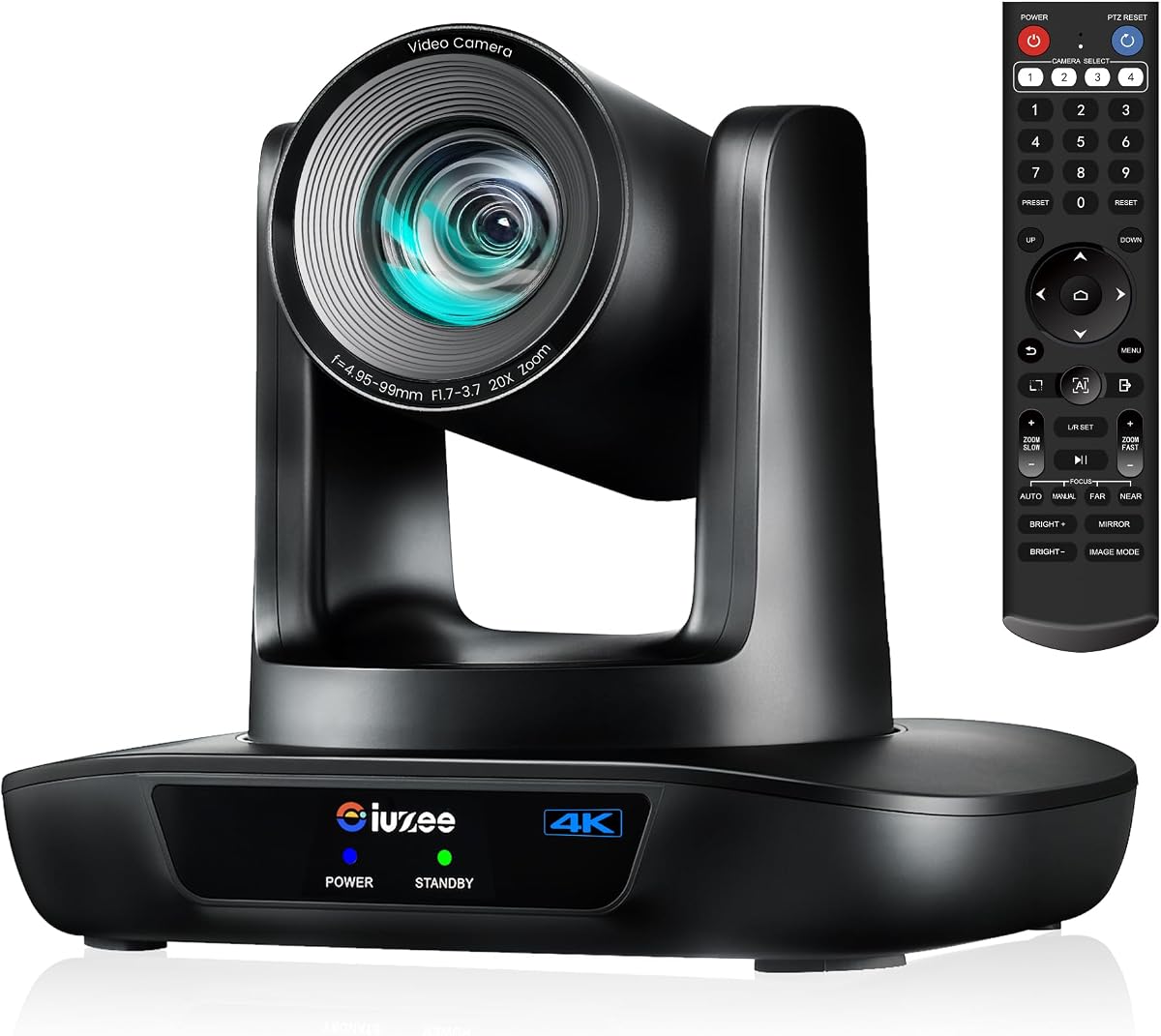
The iuZee 4K 20X is the strongest dedicated production camera in this roundup, offering the most extensive connectivity and a substantial 20X optical zoom. Its 4.7 rating reflects a capable combination of 8.29-megapixel 4K capture, AI face and figure tracking, autofocus, noise reduction, and professional broadcast controls. It is designed for spaces where framing flexibility and long-distance detail are more important than a self-contained webcam format.
We may earn a commission when you buy through this link, at no additional cost to you.
USB 3.0, HDMI, and LAN can operate as simultaneous outputs, giving integrators several ways to connect the camera. The LAN side supports MJPEG, YUY2, H.264, and H.265, along with RTMP, RTSP, SRT, and PoE under IEEE 802.3af. Presenter Mode and Auto Framing Mode support different tracking needs, while up to 255 presets make it practical to move rapidly between views. A browser interface provides setup, preview, and control.
Audio is the main omission. This is a standalone camera rather than a bundled speakerphone system, so a conference room will need a separate microphone or speakerphone. PoE also requires compatible network infrastructure, and the fixed lens prioritizes optical reach over an ultrawide room view. Those considerations make it less convenient for a simple plug-and-play office meeting, but more capable for livestreaming, education, worship, and large events.
This is the recommendation for buyers who need professional PTZ behavior, extensive I/O, and strong optical magnification. The three-year limited warranty and stated lifetime online support add confidence for fixed installations. If the application requires simultaneous meeting video and room audio, budget for a separate audio solution; otherwise, it is the most flexible premium camera in the list.
Simultaneous USB, HDMI, and LAN outputs support computer conferencing, local presentation displays, and IP production workflows. This range of native paths reduces the need for conversion equipment in a professional installation.
Facial and body recognition support continuous tracking even when a subject is briefly obscured. Presenter Mode and automatic framing give operators distinct behaviors for lectures, discussions, and changing speaker positions.
We may earn a commission when you buy through this link, at no additional cost to you.
The NexiGo N990 is a straightforward conference camera for organizations that want PTZ movement, 4K quality, and physical remote control without a complex auto-tracking feature set. Its 4.4 rating aligns it with the best-selling TONGVEO bundles in the guide. An 8.5-megapixel Sony Starvis sensor records up to 3840 by 2160 at 30fps, providing crisp detail for conventional video calls and fixed recording.
We may earn a commission when you buy through this link, at no additional cost to you.
The motorized pan and tilt mechanism covers 170 degrees in either horizontal direction and the tilt range extends from minus 35 to plus 85 degrees. Two camera presets can be recalled with a button, making it easy to move between a room view and a closer composition. The remote also handles zoom, image flipping, volume, and camera shutdown. A 5X digital zoom is available at 1080p, while automatic low-light correction helps in dim meeting rooms.
Audio is integrated but not elaborate. Dual stereo microphones use noise cancellation, and a 3.5mm jack allows an external microphone to be added. There is no AI tracking, only two saved positions, and no included conference speakerphone, which could limit performance in a large room. It also uses digital rather than optical zoom, so magnified subjects may lose detail compared with a 12X or 20X optical PTZ model.
The N990 is best for small and medium meeting spaces, hybrid classrooms, and users who prefer deliberate remote-controlled framing. Zoom certification and broad operating-system compatibility make it a low-friction option for common business platforms. Choose it when simplicity, familiar controls, and 4K output matter more than automatic subject selection or long-distance magnification.
The included remote handles the functions users expect from a fixed conference camera. Two presets make common compositions quick to retrieve without navigating complicated menus.
The 4K sensor and automatic low-light correction suit offices where lighting changes throughout the day. Digital zoom is most appropriate for emphasis rather than capturing distant presenters.
We may earn a commission when you buy through this link, at no additional cost to you.
This TONGVEO package combines a high-end 20X 4K PTZ camera with a portable Bluetooth speakerphone, making it the most complete premium bundle in the guide. Its 4.8 rating reflects strong performance across video, tracking, audio, and installation options. The camera uses an 8.29-megapixel CMOS sensor to deliver 3840 by 2160 at 30fps, while stable autofocus and a 63-degree wide lens support both room coverage and detailed subject views.
We may earn a commission when you buy through this link, at no additional cost to you.
HDMI, USB 3.0, and LAN provide multiple output choices, and the network side supports PoE, RTSP, RTMP, H.264, and H.265. AI-based facial and humanoid recognition automatically follows a speaker. The included speakerphone adds four microphone arrays, a 16.4-foot pickup range, USB and Bluetooth 5.0 connections, a wireless dongle, and a rechargeable battery for 6 to 8 hours of stated use.
As with any premium fixed camera, installation takes more planning than a laptop webcam. The camera is wired and may be desk-, wall-, tripod-, or ceiling-mounted. A 20X lens also offers less immediate coverage of a very wide room than a short-zoom model, making correct placement essential. The product's broad support for Windows, macOS, Android, Linux with UVC, and leading conferencing software reduces software friction, but physical placement and network readiness remain essential.
This bundle is ideal for large remote meetings, lecture recording, summits, church production, and professional event coverage where one package must handle both imagery and room sound. It offers the convenience of a complete conference system with the reach of a long optical lens. For buyers comparing this with the standalone iuZee model, the deciding factor is whether integrated room audio and simpler package assembly outweigh the desire for a separate audio ecosystem.
The 20X optical lens can isolate a distant presenter, while the four-microphone speakerphone captures voices around the table. This combination reduces the number of separate components needed for a large meeting.
USB supports direct computer use, HDMI supports presentation displays, and LAN with PoE supports IP streaming. The network options make the camera adaptable to both meetings and live production.
We may earn a commission when you buy through this link, at no additional cost to you.
The TONGVEO Gesture Control System stands out for its 120-degree field of view and hands-free gesture commands. Its 4.3 rating reflects a distinctive feature set rather than the highest technical specifications. The 4K PTZ camera rotates 350 degrees horizontally and 180 degrees vertically, while AI tracking can be toggled using a selection of hand gestures or through the included remote.
We may earn a commission when you buy through this link, at no additional cost to you.
Six gesture commands provide direct control: an OK sign activates AI tracking and multi-human tracking, a V sign selects solo tracking, directional gestures adjust zoom, a thumbs-up enters multi-human tracking, and an open palm turns tracking off. The camera offers a 5X digital zoom, 10 preset positions, RS232 and RS485 support, and USB 3.0 plug-and-play connectivity. The supplied speakerphone includes noise-reducing stereo microphones, a 16.4-foot pickup range, and a rechargeable battery.
The major compromise is magnification. Because the 5X zoom is digital rather than optical, a distant presenter will not gain the detail available from a 12X or 20X optical model. The extremely wide lens can also introduce edge distortion and make faces smaller in a large video frame. Users of Zoom, Teams, or Skype may need to disable application mirroring if the camera menu appears reversed.
The system is most appropriate for close, wide conference tables where participants frequently change seats and operators want a hands-free way to control framing. It is also useful for classrooms and training spaces that benefit from gesture operation. Choose it for the broad field and creative controls, not for long-distance detail.
Gesture commands can change tracking modes and zoom level, which is convenient when the camera is mounted out of reach. The remote and serial-control options preserve conventional control when gestures are inconvenient.
The 120-degree field of view helps include people seated along the sides of a table. It is best paired with a close mounting position and moderate digital zoom.
We may earn a commission when you buy through this link, at no additional cost to you.
This TONGVEO model combines 1080p at 60fps with 20X optical zoom, making it a strong choice when motion smoothness and distant detail matter more than 4K resolution. Its 4.2 rating reflects solid core specifications and broad software compatibility. AI tracking supports single-person tracking and multi-person automatic framing, allowing the camera to adjust pan, tilt, and zoom around active participants.
We may earn a commission when you buy through this link, at no additional cost to you.
The camera provides HDMI and USB 3.0 outputs, with no additional drivers required. Its motor supports 350-degree pan, 180-degree tilt, and up to 255 saved presets. Optical zoom preserves detail better than digital magnification, making the lens useful for church stages, classrooms, seminars, and large meeting rooms. It is compatible with OBS, vMix, Zoom, Microsoft Teams, and YouTube, and the included remote offers fast preset recall.
Compared with the 4K models, its main limitation is image resolution. 1080p is still highly practical for conventional conferencing and streaming, but it provides less latitude for cropping, recording, and large-display playback. The listing describes a camera system, but no separate conference speakerphone is identified among the highlighted features, so room audio may require another device. A 20X lens also needs careful positioning in wide rooms.
This camera is best for installations that prioritize fluid 60fps motion, extensive preset recall, and long optical reach without paying for a 4K sensor. It is particularly compelling for presenters who move across a stage or for production teams that need quick cuts between saved camera positions. Buyers prioritizing a complete room-audio package should choose a bundled model instead.
60fps output makes movement and gestures appear smoother than a typical 30fps feed. This is useful for active teaching, live events, and presentations involving substantial body movement.
Up to 255 presets let an operator prepare extensive camera positions for a large venue. Fast recall makes the system practical for productions that need to react quickly as speakers change.
We may earn a commission when you buy through this link, at no additional cost to you.
The Logitech PTZ Pro 2 is a proven-style conference room camera aimed at professional applications, including training, conferences, and large events. Its 4.3 rating reflects a stable feature set centered on image quality, motorized optical zoom, and smooth preset movement. The camera delivers HD 1080p video over USB and is designed to give remote participants a clear view of people, whiteboards, objects, and presentation details.
We may earn a commission when you buy through this link, at no additional cost to you.
Optical zoom provides more useful detail than digital cropping when the operator needs a close-up. The wide position can show the entire room, while the motorized pan, tilt, and zoom system moves toward presenters or shared content. Camera-side video processing is designed to produce smoother streams and conserve bandwidth in applications such as Skype for Business. Smooth transitions between preset positions improve the experience during formal meetings.
The Logitech model does not advertise AI auto-tracking in the supplied information, so it is less suited to rooms where participants move constantly and an operator is unavailable. It also does not include a conference speakerphone, meaning microphone and room-audio selection remain separate considerations. As a result, it fits a defined conference-room infrastructure more than a do-it-yourself bundle.
Choose the PTZ Pro 2 when established professional video behavior, optical close-ups, and smooth motorized framing are the priorities. It is well suited to corporate conference rooms, training spaces, and events using a predictable lectern or presenter area. Users who need automatic tracking or an all-in-one voice system should instead examine the TONGVEO bundles in this guide.
Moving from a wide room composition to a tighter presenter view is central to the camera's design. Optical zoom retains more subject detail than a digital crop.
Enhanced pan, tilt, and zoom motor performance helps preset transitions feel controlled and professional. This is valuable when a meeting alternates between people, whiteboards, and presentation screens.
We may earn a commission when you buy through this link, at no additional cost to you.
The 12X TONGVEO system is designed as a middle ground between a wide room camera and a long-zoom production unit. It combines a 1080p 60fps AI-tracking PTZ camera with a Bluetooth conference speakerphone. Its 4.4 rating reflects a useful balance of 12X optical reach, a 75-degree field of view, and integrated voice pickup, making it a credible fit for medium and large meeting rooms.
We may earn a commission when you buy through this link, at no additional cost to you.
The 2.07-megapixel camera supports simultaneous HDMI and USB 3.0 output, 350-degree pan, and 180-degree tilt. Deep-learning-based humanoid detection and face recognition allow it to follow speakers around the room. Ten preset positions are available through the IR remote. Meanwhile, the speakerphone uses a full-duplex microphone array with echo cancellation, reaches 16.4 feet, and connects through USB, Bluetooth 5.0, or a dongle.
The stated use case covers rooms of about 60 square meters and meetings with 20 to 30 people, although real performance depends on seating, acoustics, and microphone placement. The 75-degree field is narrower than the 114-degree and 120-degree options in this list, so it may need careful positioning. It also outputs Full HD rather than 4K, and only ten presets are offered, which is fewer than several competing models.
This is a good recommendation for organizations seeking a complete package with more optical reach than a standard wide-angle conference camera. It can serve medium-to-large meetings, live training, telemedicine, education, and church streaming. Choose it when 12X magnification, 60fps motion, and integrated conference audio matter more than 4K resolution or a large preset library.
The 12X lens can make a presenter appear substantially larger than with a 3X camera. Optical magnification preserves detail without relying on a crop from the sensor.
The matching speakerphone includes echo-canceling microphones and several connection options. This simplifies deployment in rooms where every participant must be heard clearly.
We may earn a commission when you buy through this link, at no additional cost to you.
This 4K HDMI 20X camera is an adaptable option for integrators who need a long optical lens, human auto-tracking, and several control methods. Its 4.6 rating reflects a capable production specification. The camera uses a 1/2.8-inch HD CMOS sensor, a distortion-free 54-degree wide lens, 20X optical zoom, and fast autofocus, with 2D and 3D noise reduction for image clarity.
We may earn a commission when you buy through this link, at no additional cost to you.
Video can be streamed simultaneously through HDMI, USB, and IP, while the included IR remote, RS232, and RS485 provide different ways to manage the camera. VISCA, Pelco-D, and Pelco-P protocols are supported, as are ONVIF, SRT, RTSP, and RTMP. The camera can therefore fit into a control-room environment where manually calling a technician is impractical. It also works with popular conferencing and streaming applications across Windows and macOS.
There are two important qualifications. The default HDMI resolution is 4K, so a compatible 4K display is needed to see the native output, although the setting can be changed to 1080p at 60fps. The camera does not include a conference speakerphone, and its monocular human tracking is less elaborate than the facial and body recognition described for some other models. The narrower 54-degree view also requires deliberate placement.
This camera is best for churches, schools, hospitals, weddings, and broadcast installations where 20X magnification and remote serial control are valuable. It is also a sensible choice for organizations that already have a well-designed audio system and require the camera to integrate with professional control software. Its broad protocol support makes it more of an installation component than a simple all-in-one meeting product.
RS232, RS485, VISCA, and Pelco control options allow integration with third-party systems. This is useful in venues where the camera is operated from a production desk rather than a laptop.
The 20X optical zoom supports close views of distant speakers, while HDMI, USB, and IP provide deployment flexibility. Native 4K display output requires compatible presentation equipment.
We may earn a commission when you buy through this link, at no additional cost to you.
Choosing a Ptz Conference Camera means balancing room coverage, subject detail, tracking behavior, room audio, connectivity, and installation requirements. The most important step is mapping the camera to the actual meeting space rather than comparing resolution figures alone.
Optical zoom physically magnifies the sensor image and generally preserves more detail than digital zoom, which enlarges and crops existing pixels. A 3X lens may be sufficient for a compact table, while 12X or 20X models are more useful when presenters stand across a deep room, on a stage, or near a large display. Digital zoom can still help frame a nearby speaker, but it should not be treated as equivalent to a long optical lens.
4K models provide more image information for large displays, recording, and cropping, while 1080p remains effective for standard meetings and streaming. Frame rate matters when movement is frequent: 60fps produces smoother motion for teaching, live events, and active speakers. The output path must also support the intended resolution. In the TONGVEO 4K 3X bundle, HDMI supports 4K at 30fps, whereas USB is specified for 1080p, so connection choice affects the final image quality.
AI tracking can detect faces, human figures, or both, then move the camera to follow the active presenter. Presenter mode may center one person, while automatic framing or multi-person tracking is useful around a table. Tracking quality depends on the field of view, lighting, distance, and whether people cross behind obstacles. Remote-controlled framing remains a useful backup in all automatic systems, particularly for a fixed lectern or predictable presentation area.
A wide field of view captures more participants and reduces the need to reposition the camera, but faces become smaller in the transmitted frame. Narrower fields support more intimate compositions and greater optical reach but require careful placement. The list ranges from a 120-degree gesture-control model to a 54-degree long-lens camera. A broad table may benefit from 93 to 120 degrees, while a deep stage may justify 12X or 20X optical zoom.
A camera does not automatically provide adequate voice coverage for a group. Bundled speakerphones add full-duplex audio, echo cancellation, multiple microphones, and a portable speaker, which simplifies room deployment. Standalone cameras generally offer more installation flexibility but require a separate conference phone, boundary microphone, or mixer. Voice pickup distance, participant count, room acoustics, and whether simultaneous speaking is expected should guide that choice.
USB is convenient for direct computer meetings, HDMI serves local presentation screens, and LAN or IP enables network-based streaming and centralized control. PoE can simplify a fixed installation by carrying power and data over one network cable when suitable infrastructure is present. Common streaming protocols such as RTMP, RTSP, SRT, and ONVIF increase compatibility, but the destination software and network must support the chosen protocol.
PTZ cameras may be controlled by an infrared remote, a browser, a keyboard controller, or serial equipment such as RS232 and RS485. Preset count matters for venues with several fixed views, while gesture control can be convenient for small teams. Desk, wall, tripod, and ceiling mounting provide flexibility, but cable length, power access, image direction, and lighting should be evaluated before drilling or mounting.
Popular platforms such as Zoom, Microsoft Teams, Google Meet, WebEx, OBS, and YouTube are supported by most or all products in this guide, but that does not guarantee identical behavior. Check the camera's operating-system requirements, UVC support where relevant, application mirroring settings, and available frame rates. Manufacturer warranties and technical support are also useful considerations for permanently installed systems, particularly when remote configuration assistance may be needed.
Begin by positioning the camera so its wide or zoomed view includes the people and presentation areas that matter most. Mount it above eye level when possible, keep the lens away from direct backlighting, and test the framing with the exact conferencing application. Connect the camera through USB for a computer meeting, HDMI for a local display, or LAN for network streaming, then connect the speakerphone through its most reliable available method.
After the basic connection works, configure the resolution, frame rate, tracking mode, and presets. Test single-person tracking by having the presenter walk, turn, and briefly pass behind another person. Then test automatic framing around a table and use the remote to establish reliable wide, close, and content views. If a conferencing application reverses the image, follow the camera manufacturer's mirror instructions and check the application's own mirror setting.
For care, clean the lens gently with a soft microfiber cloth and keep the camera away from dust, moisture, and direct sunlight. Check cable connections and mounting hardware periodically, especially on ceiling or wall installations. Update software only after confirming compatibility, retain the included remote and mounting accessories, and document preset positions and network settings so future maintenance or replacement is straightforward.
A PTZ camera can pan, tilt, and zoom, often moving automatically to frame the active speaker. A normal webcam usually remains fixed and depends on digital cropping or manual repositioning. PTZ models are better suited to larger rooms, lecture spaces, and professional installations.
It depends on how the video will be viewed and recorded. 4K provides more detail on large displays and greater editing flexibility, but 1080p is sufficient for many standard meetings and streaming workflows. Check that the computer, application, cable, and display support the intended resolution.
Three times may work for a small table, while 12X or 20X is more helpful in deep rooms, auditoriums, churches, and lecture halls. Optical zoom generally preserves more detail than digital zoom. Camera placement and the distance to the subject are as important as the magnification figure.
Some camera-only models include built-in microphones, while several bundles in this guide include a separate conference speakerphone. Camera-only options generally work best with existing room audio. Complete bundles are often more convenient for offices and meeting rooms without dedicated audiovisual infrastructure.
USB is convenient for direct connection to a laptop or meeting computer, while HDMI carries display video to a television or presentation monitor. LAN or IP output supports professional streaming, centralized control, and sometimes PoE. The best choice depends on the existing equipment and production workflow.
Most modern tracking cameras in this guide use face and human-figure recognition to follow a moving subject. Performance can vary with lighting, distance, crowded scenes, and temporary obstruction, so operators should still know how to adjust framing or recall a preset manually.
PoE is not required for every room, but it can simplify a fixed network installation by carrying power and data over one cable. A PoE switch or compatible network infrastructure is needed. USB-only and HDMI-only users may not need PoE at all.
Test the actual meeting application, resolution, microphone, and speakerphone before participants join. Check lighting, automatic tracking, preset recall, image orientation, and the view of important presentation areas. A short rehearsal also reveals whether the camera and computer need different cables or settings.
The TONGVEO 1080P 3X bundle stands out as the best budget all-in-one option because it includes both a wide-angle AI-tracking camera and a Bluetooth speakerphone. The TONGVEO 4K 3X system is the best overall choice for most organizations, offering 4K presentation quality, AI framing, broad platform support, and a strong 4.8 rating. The iuZee 4K 20X PTZ is the premium choice for professional streaming, long optical reach, and extensive network and control options.
Prioritize the features your room actually needs. A small meeting table may need little zoom and a wide field, while a lecture hall or church may require 12X or 20X optical magnification, dependable tracking, and professional outputs. Integrated audio can save substantial setup effort, but a standalone camera offers more control when high-quality room sound already exists.
Before buying, confirm the camera's supported operating system, application compatibility, output resolution, installation requirements, and warranty coverage. Current prices, discounts, bundle contents, and availability can change, so compare the latest listing details before making a final purchase decision.