
Logitech Blue Yeti
4.6Editor score
Four selectable pickup patterns
Onboard gain and mute
Zero-latency headphone monitoring
Blue VO!CE effects software
Adjustable desktop stand
A microphone for Zoom calls should make your voice easy to hear without requiring you to sit unnaturally close to your computer or raise your voice. The right model depends on whether you work alone at a desk, share a small office with several people, or need a lightweight option for travel and online learning.
We compared all ten products by looking at microphone type, directional pickup, noise and echo controls, mute access, connection method, device compatibility, monitoring, and practical room coverage. The list includes full-size USB condenser microphones, compact conference microphones, a conference speakerphone, and a wired headset.
Each review explains where that microphone is most useful, what controls it provides, and which compromises may affect your calls. Ratings and product details reflect the supplied listings, while prices and availability can change, so compare the current listing before making a purchase.
4.6Editor score
4.2Editor score
4.3Editor score
As an Amazon Associate we earn from qualifying purchases.
This side-by-side comparison covers the essential differences among conference speakerphones, USB condenser microphones, tabletop 360-degree microphones, and a wired call headset, with special attention to pickup style, controls, portability, and platform compatibility.






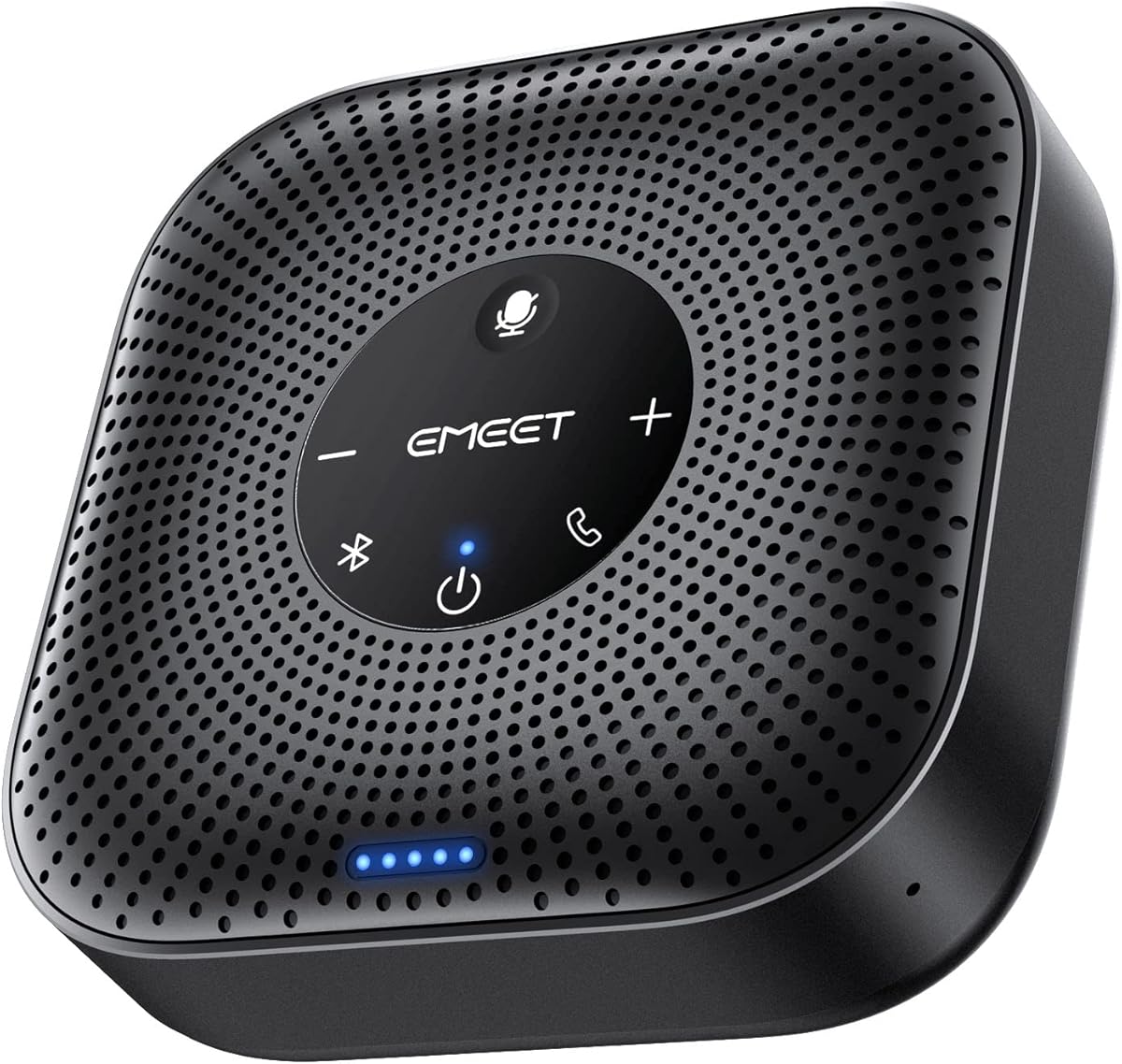
The EMEET M0 Plus is a conference speaker and microphone with a four-microphone array, a 360-degree pickup design, and a 3W speaker. Its 4.2 rating reflects a broadly capable meeting-room device, with the strongest appeal coming from the way it combines microphone capture, audio playback, wireless connectivity, and portable power in one enclosure.
We may earn a commission when you buy through this link, at no additional cost to you.
The four AI microphones use EMEET's upgraded VoiceIA algorithm to filter background noise and reduce the echo created by the speaker. That combination makes the M0 Plus more appropriate than a conventional desktop mic when several people share a table or a home office. Full-duplex operation allows natural conversation, while even sound distribution helps remote participants hear the room without moving toward the device.
There are several trade-offs. A speakerphone does not isolate one speaker as precisely as a cardioid USB condenser microphone, and a shared unit can make it harder to determine who said something. It is also larger and more complex than a basic desktop microphone. Nevertheless, those compromises are reasonable for users who want one device to handle both speaking and hearing in a meeting.
The M0 Plus is a strong choice for small and medium meetings, home offices, and business travel. It supports USB-C, an included USB-C-to-A adapter, and Bluetooth 5.0 with single- or dual-device connections, while working with Zoom, Microsoft Teams, Slack, and Webex. For one person in a quiet office, a dedicated condenser mic may be more precise, but this is the most complete all-around option in the group for shared conversations.
The four-microphone array can pick up speech from different directions, reducing the need to pass one device between participants. It is particularly useful when attendees lean back, take notes, or sit around a conference table rather than remaining directly in front of a narrow pickup zone.
USB-C offers a straightforward computer connection, while Bluetooth 5.0 supports single-device and dual-device pairing. The included adapter broadens compatibility with computers that use USB-A, and the device works with major conferencing platforms without requiring additional drivers.
We may earn a commission when you buy through this link, at no additional cost to you.
The Logitech Blue Yeti is a full-size USB condenser microphone whose 4.6 rating is the highest among the products featured here. Its three-capsule array, multiple pickup patterns, and physical controls make it especially attractive for users who want a polished microphone for Zoom calls as well as recording, streaming, podcasting, and gaming.
We may earn a commission when you buy through this link, at no additional cost to you.
Cardioid, omnidirectional, bidirectional, and stereo patterns let you adapt the Yeti to different situations. Cardioid is useful at a desk, omnidirectional can include a wider group, bidirectional can face two sources, and stereo supports two-sided capture. Onboard headphone volume, pattern selection, instant mute, and microphone gain provide quick control without repeatedly opening software.
The main drawback is size. A full-size condenser setup occupies more desk space than a compact conference microphone, and it does not function as an all-in-one speakerphone for group audio. Its software-oriented feature set may also be unnecessary if your only goal is a simple work call. Even so, the flexible stand, plug-and-play USB connection, and no-latency monitoring deliver exceptional versatility.
Choose the Blue Yeti if you work alone, host frequent online presentations, or want one high-quality microphone to handle calls and content creation. It is less obvious than the EMEET M0 Plus for a multi-person meeting where every attendee needs to hear the room through the same device, but it is the strongest premium choice for a focused desktop setup.
The four-pattern system is the Blue Yeti's defining advantage over many desk microphones. Users can change from focused cardioid capture to broad room pickup without replacing the hardware, which makes the microphone useful across interviews, podcasts, presentations, and ordinary calls.
The combination of gain, mute, pattern, and headphone-volume controls gives immediate command over the signal. No-latency monitoring also makes it easier to judge vocal level and avoid surprises while presenting, recording, or participating in a long meeting.
We may earn a commission when you buy through this link, at no additional cost to you.
The TONOR G11 is a USB conference microphone built for small and medium online meetings. It carries a 4.3 rating and distinguishes itself through 360-degree omnidirectional pickup, an advertised capture distance of 11.5 feet, and a simple design that lets participants speak naturally without clustering around the unit.
We may earn a commission when you buy through this link, at no additional cost to you.
Because it is a condenser microphone rather than a speakerphone, the G11 focuses on transmitting voices to the computer. Its broad pickup range can capture subtle sounds from multiple directions, which is useful for seminars, remote training, negotiations, court reporting, and business video chats. Compatibility with Windows and macOS means setup generally consists of connecting the USB cable and selecting the microphone as the input device.
The trade-off is that broad pickup can also capture background sounds, and the listing does not describe a dedicated built-in echo-canceling function comparable to some newer alternatives. You still need speakers or headphones for room audio, and a single USB microphone may not provide the same polished full-duplex conference experience as a dedicated speakerphone.
The G11 is a sensible choice for a small office, classroom, or group seated around a table when everyone needs an easy microphone input. It is especially useful for users who value a long pickup radius and mute button without a more complex device. For a solo professional, a cardioid condenser may provide cleaner isolation, but for shared conversations the G11 remains purposeful.
An advertised 11.5-foot pickup distance gives the G11 room to serve a group without requiring everyone to sit close. The 360-degree pattern is particularly useful when participants move around or when the microphone is placed centrally on a meeting table.
The USB connection requires no drivers, and the physical mute button is easy to find during a meeting. A blue indicator light helps confirm whether the microphone is working, reducing the chance of accidentally transmitting an unwanted sound.
We may earn a commission when you buy through this link, at no additional cost to you.
The ZealSound K66 is a USB condenser microphone with a 4.4 rating and a broad set of tools for calls and content creation. Its cardioid capsule, 40Hz–18kHz frequency response, 46kHz sampling rate, and –45dB ±3dB sensitivity make it a strong option for users who want a detailed and balanced desktop microphone.
We may earn a commission when you buy through this link, at no additional cost to you.
The intelligent noise reduction mode is designed to reduce practical distractions such as keyboard clicks, fan noise, air-conditioner hum, and background chatter. A default mode preserves a warmer, natural vocal character for quieter spaces. Separate knobs for microphone gain, monitoring volume, and echo give direct control, while the built-in 3.5mm headphone jack provides real-time, zero-latency monitoring.
This level of hardware control is not necessarily a disadvantage, but it can be more than a casual caller needs. The top-addressed design also asks the speaker to aim toward the top of the mic, and the 70.87-inch cable and broad accessory package may look busier on a compact desk. Mobile adapters are included, but USB desktop use remains the primary focus.
The K66 is an excellent choice for a home office where fan noise, keyboard use, or nearby household sounds affect calls. It also serves creators who want monitoring, gain control, and noise reduction in one microphone. If your priority is simply an inexpensive basic mic for quiet rooms, one of the more streamlined models may be easier to manage.
Holding the mute button activates the noise reduction mode, giving users a direct way to suppress common distractions. The blue indicator confirms the active mode, while the default setting can be preferable when speaking in a quieter space and preserving a natural tonal balance.
Independent gain, monitoring, and echo controls make the K66 suitable for callers who also record or stream. Real-time headphone feedback helps prevent clipping, while the top-addressed cardioid design focuses capture on the intended speaker.
We may earn a commission when you buy through this link, at no additional cost to you.
The Adjustable Gooseneck USB Microphone is a straightforward desktop option with a 4.4 rating. Its most useful features are the 360-degree adjustable gooseneck, one-click mute button, status LED, and driver-free USB operation for Windows and macOS computers.
We may earn a commission when you buy through this link, at no additional cost to you.
The omnidirectional condenser design can pick up sound from multiple directions, allowing the microphone to be moved around the desk without worrying about maintaining a fixed vocal angle. The gooseneck provides further positioning flexibility, while the metal pipe and heavy-duty ABS stand give it a stable appearance. Noise-canceling technology is included to help reduce background noise and echo.
This microphone does not include a headphone output, so it cannot be used for zero-latency monitoring. It is also explicitly not compatible with Xbox, Raspberry Pi, or Android. Omnidirectional capture may pick up more of the room than a focused cardioid microphone, although the included noise processing is designed to improve clarity.
It is best for Windows or Mac users who want a basic, repositionable microphone for calls, dictation, gaming communication, or online learning. The 1.8-meter cable gives enough freedom to place the stand near the speaker, while mute and LED controls keep call management simple. Buyers seeking mobile support or monitoring should choose a more specialized alternative.
The flexible gooseneck can be angled toward the speaker after the base is placed, which helps a desktop user avoid a fixed and uncomfortable speaking position. Its omnidirectional pickup then captures the voice from the adjusted direction.
A one-click control and built-in LED make microphone status visible during a call. This is a small but important convenience when joining and leaving meetings repeatedly or when privacy matters.
We may earn a commission when you buy through this link, at no additional cost to you.
The Amazon Basics Condenser Microphone is an uncomplicated USB mic with a 4.4 rating. Its 14mm diaphragm, cardioid pickup, 360-degree adjustable stand, and one-touch mute function make it a practical option for Zoom calls, streaming, podcasting, solo vocals, and instrument recording.
We may earn a commission when you buy through this link, at no additional cost to you.
The cardioid pattern focuses on the front of the microphone and is intended to isolate the speaker from background noise. That makes it well suited to a home office or desk-based call, especially when the user can speak directly into the mic. The stand rotates to follow the speaker, and the included shock absorber and silicone boot help reduce unwanted movement and vibration.
The controls are intentionally limited. There is no listed gain knob, headphone output, or multi-pattern selection, so users who need fine signal adjustment or real-time monitoring may want a more specialized condenser microphone. It also requires a USB data cable and does not offer Bluetooth connectivity, which limits flexibility away from the desk.
Choose this model when you want an approachable USB microphone for everyday calls and creative recording without navigating complex software. It works without additional drivers on supported Windows and Mac systems, and its detachable design lets it move to a compatible tripod, boom arm, or standard 5/8-inch microphone stand. It is a sensible all-around desktop mic for users who value simplicity and focused pickup.
The cardioid pattern is the key benefit for individual calls because it concentrates on the area in front of the microphone. This can make a home-office setup sound more direct than an omnidirectional model that captures activity from every side.
The rotating stand can be repositioned to match the user's posture, while the built-in shock absorber helps control vibration. The detachable body also supports a tripod, boom arm, or standard microphone stand for more advanced setups.
We may earn a commission when you buy through this link, at no additional cost to you.
The TONOR TM20 is a tabletop conference microphone with a 4.4 rating and an advertised pickup range of 16.4 feet. It is designed for online meetings, teaching, and distance learning, using a 360-degree omnidirectional condenser design to capture voices around the device.
We may earn a commission when you buy through this link, at no additional cost to you.
Built-in noise reduction is intended to block distracting sound and eliminate echo, helping remote participants hear a clearer signal. A physical one-button mute control includes an indicator that shows blue while working and red while muted. USB 2.0 connectivity makes setup straightforward on supported Windows and macOS computers without driver software.
The very broad pickup range is useful in a classroom or conference space, but it can also capture ambient noise and conversations that are not part of the call. This is not a speakerphone, so room audio still needs to come through computer speakers or a headset. The listing also does not mention a headphone output, so the mic does not provide private monitoring.
The TM20 suits facilitators, teachers, and small-group meeting hosts who need people to be heard from around a room. It works with Zoom, Skype, GoToMeeting, WebEx, Hangouts, and related services. For personal desk calls, a cardioid microphone may isolate your voice more precisely, but for shared-room coverage, the TM20's long 360-degree range is the central advantage.
The advertised 16.4-foot range allows the TM20 to serve a broad table, classroom, or training area. Omnidirectional capture also means moving around the room does not require repeatedly changing the microphone's direction.
The soft-touch mute control and colored indicator make it easy to confirm whether the microphone is transmitting. That convenience is valuable for teachers and presenters who frequently switch between speaking and listening.
We may earn a commission when you buy through this link, at no additional cost to you.
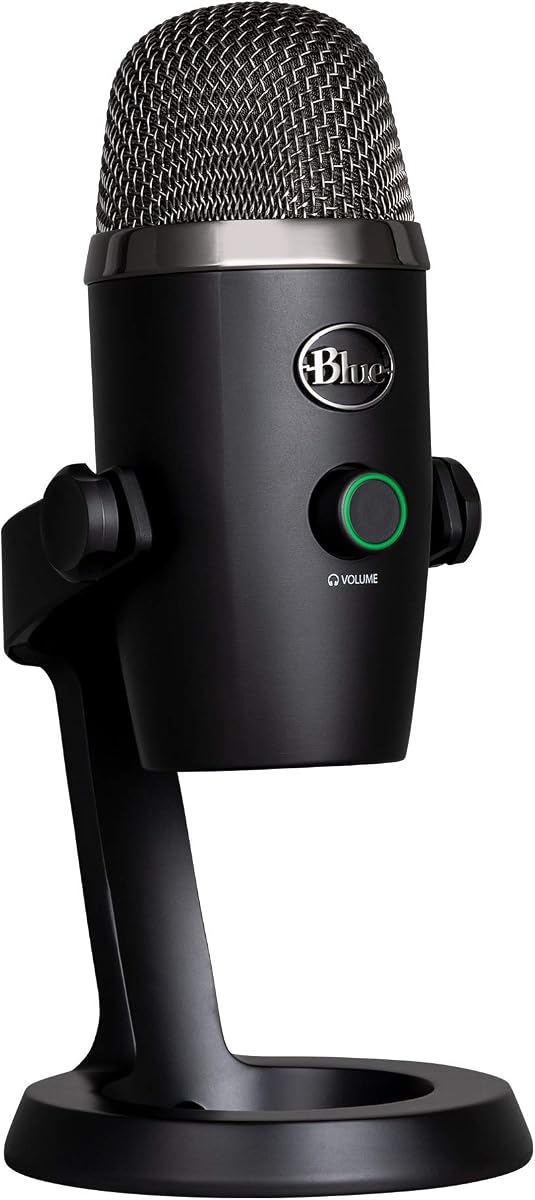
The Logitech Blue Yeti Nano is a compact USB microphone with a 4.6 rating. It preserves the Blue VO!CE ecosystem, detailed voice capture, onboard controls, and headphone monitoring while using a smaller enclosure than the full-size Blue Yeti, making it especially appealing for a focused Zoom workstation.
We may earn a commission when you buy through this link, at no additional cost to you.
Two custom capsules provide a 4.6-rated alternative for clear voice pickup, and the microphone offers cardioid and omnidirectional patterns. Cardioid works well for desk calls, while omni can include more of the room when necessary. Onboard controls include headphone volume, mute, and pattern selection, so users can change behavior without opening a settings menu.
The main limitation is that the Nano does not offer the full-size Yeti's four patterns, including bidirectional and stereo options. It is also wired by USB, so it is not a portable microphone for calls away from a computer. Its small size, however, is an advantage when desk space is limited or the microphone needs to stay visually unobtrusive on camera.
Buy the Yeti Nano for a solo professional, streamer, or remote worker who values polished sound and real-time monitoring in a compact package. It is a better fit than a basic plastic conference mic when vocal quality and tactile controls matter, and it remains a strong complement to games, podcasts, and video calls performed from one computer.
The compact body addresses one of the most common drawbacks of desktop condenser microphones, which is their footprint. It can sit beside a laptop or monitor while still providing a dedicated USB microphone with professional-style voice capture.
The onboard headphone output supports precise, no-latency monitoring, and a physical volume control keeps listening comfortable. Pattern and mute controls are also accessible directly from the microphone, reducing interruptions during a call.
We may earn a commission when you buy through this link, at no additional cost to you.
The Lenovo USB-A Wired Stereo Headset is an integrated headset for calls, with a 4.4 rating. It combines a double-sided boom microphone, over-ear listening, AI-assisted noise cancellation through Lenovo Accessories and Device Manager, and a 140g lightweight design.
We may earn a commission when you buy through this link, at no additional cost to you.
The headset's inline control box puts volume, call, and mute functions close at hand, which is useful during back-to-back meetings. Replaceable earcups offer a practical upgrade path, while the double-sided boom can position the microphone near the speaker's mouth for clearer voice pickup. AI noise cancellation is intended to improve clarity in busy work environments.
The wired USB-A connection is dependable but less flexible than USB-C, Bluetooth, or wireless alternatives. Users must also adjust the boom arm for the best result, and a headset may feel less comfortable than a separate desktop microphone for extended recording sessions. Some users may also need to install or access the Lenovo software to make the most of its noise-canceling features.
This headset is a strong choice for employees who want one simple device for hearing and speaking. It supports Zoom, Microsoft Teams, Google Meet, Google Voice, Slack, GoToMeeting, WeChat, and Cisco Webex, making it versatile across meeting platforms. Choose it for office calls and focused computer work, and choose a separate USB conference microphone when room coverage matters more than a private headset.
A self-contained headset removes the need to coordinate a separate microphone and headphones. The boom microphone captures speech close to the mouth, while stereo earcups provide private, comfortable monitoring for calls and online classes.
At 140g, the headset is designed for extended wear, and replaceable earcups help maintain the condition of a frequently used setup. Inline call, volume, and mute controls allow quick changes without navigating software during a meeting.
We may earn a commission when you buy through this link, at no additional cost to you.
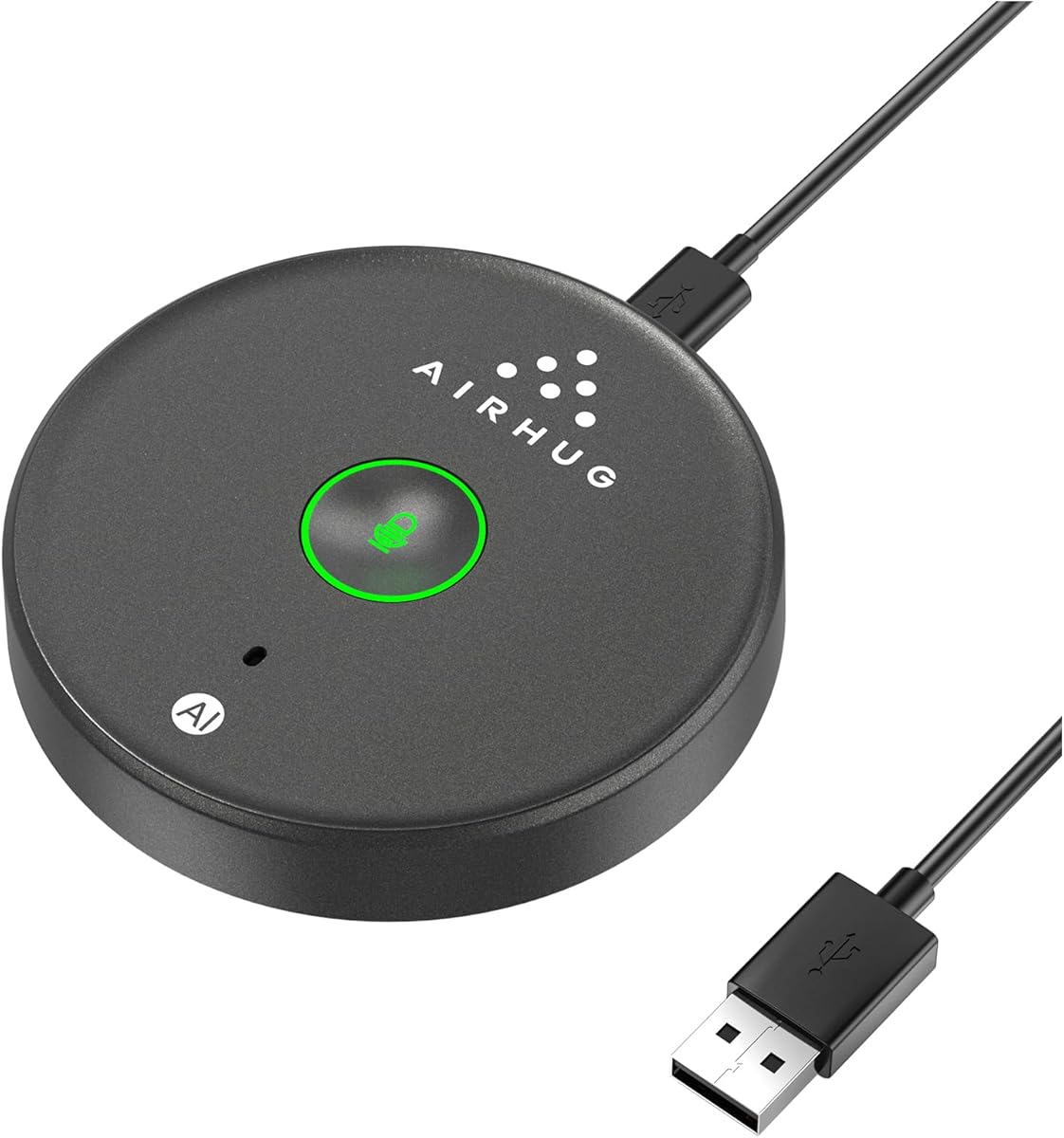
The AIRHUG 21 USB Microphone is a compact conference microphone with a 4.3 rating. Its defining combination is 360-degree omnidirectional pickup within a six-foot radius, a 48kHz sampling rate, and two operating modes for reducing noise or retaining a more original sound.
We may earn a commission when you buy through this link, at no additional cost to you.
AI Noise Reduction Mode is designed to suppress fan noise, keyboard clicks, and general background chatter. Original Mode provides a natural, realistic presentation for quieter rooms. The microphone remembers the last selected sound mode, begins unmuted after a restart, and uses blue, green, and red indicators to communicate its current state clearly.
There is no built-in speaker, so computer speakers or headphones are still required for audio output. More importantly, the listing explicitly states that the AIRHUG 21 does not offer echo cancellation. That makes it less appropriate for a two-person call where speaker audio might feed back into the microphone, and the six-foot range is narrower than several other conference models.
The AIRHUG 21 is a good budget pick for a solo professional, online class, or small conversation involving one to three people. It supports Zoom, Skype, Microsoft Teams, Google Meet, Webex, FaceTime, and other meeting applications, and it works with Windows and Mac without driver installation. Its compact 86mm body and 6.5-foot cable also make it easy to carry between workspaces.
Noise Reduction Mode is useful when fans, typing, or nearby activity compete with your voice. Original Mode is better for quiet rooms where a natural sound is preferred, and the microphone remembers the last choice across restarts for convenient daily use.
The low-profile circular body, anti-slip base, and included USB-C-to-A cable make the AIRHUG 21 easy to deploy on different desks. Its stated suitability for one to three participants aligns with a home office, travel workspace, or small online lesson.
We may earn a commission when you buy through this link, at no additional cost to you.
The most useful Zoom microphone depends on your room, the number of speakers, and the type of computer you use. Evaluate room coverage, pickup direction, controls, connection method, and platform support before choosing a model.
A cardioid microphone concentrates on the area directly in front of it and is usually the best choice for one person at a desk. Omnidirectional microphones capture from every direction and make more sense when several people share a room, although they can also pick up unwanted background sound. Bidirectional and stereo patterns are less common for everyday calls but can be useful when recording across a table or capturing two separated sources.
Pickup distance is more important than appearance when several attendees need to be heard. The TONOR TM20 advertises a 16.4-foot range, the TONOR G11 offers 11.5 feet, and the AIRHUG 21 is designed around a six-foot radius. Wider coverage reduces the need to move the microphone but may also capture more room noise. In a quiet private office, a focused desktop mic can sound cleaner than a broad conference pickup.
A USB microphone transmits your voice but does not automatically provide room audio. A conference speakerphone combines microphone pickup with a built-in speaker, making it a convenient single-device solution for a shared office. The EMEET M0 Plus is the clear speakerphone in this group, with a 3W speaker and daisy-chain support. If you already use good headphones or computer speakers, a dedicated USB microphone may be simpler and cheaper.
Noise reduction can make voices easier to understand in imperfect rooms, while echo control prevents a speaker from being picked up again by the microphone. Several models in the list include noise reduction, but feature quality and processing behavior can differ. The AIRHUG 21 explicitly lacks echo cancellation, which is an important distinction for two-way calls. If your room is quiet and you speak directly toward a focused microphone, you may need less processing than in a busy shared space.
A physical mute button and visible status light are useful during meetings because they reduce uncertainty about whether your microphone is live. The Logitech Yeti, ZealSound K66, AIRHUG 21, TONOR models, and Amazon Basics mic all provide direct mute access in different forms. Headphone monitoring is a separate feature: the Blue Yeti, Yeti Nano, and ZealSound K66 provide zero-latency output, helping you judge your own level and clarity.
Most of the microphones in this guide use USB and work with Windows and macOS without extra drivers, but not every model supports every device family. The EMEET M0 Plus also supports Bluetooth 5.0 and USB-C, while the Lenovo headset uses a wired USB-A connection. Confirm that your conferencing application recognizes the selected input device, and note that the adjustable gooseneck model excludes Xbox, Raspberry Pi, and Android.
A full-size condenser can improve sound quality and offer more controls, but it usually occupies more desk space than a conference puck. The Yeti Nano provides premium features in a compact form, while the AIRHUG 21 is especially easy to carry. The EMEET M0 Plus adds portability through its rechargeable battery and wireless support, while a wired USB mic remains dependable for a fixed workstation.
Some microphones also support recording, podcasting, streaming, voice-over work, and gaming. The Blue Yeti, Yeti Nano, and ZealSound K66 provide onboard gain, monitoring, and adjustable pickup options, making them useful beyond Zoom. If call quality is your only requirement, a simpler conference microphone may be more efficient, but a feature-rich condenser offers better long-term value if you create content as well.
Begin by placing the microphone according to its pickup design. Position a cardioid model directly in front of the speaker, preferably outside the path of laptop fans. For an omnidirectional conference microphone, put it near the center of the group and keep it unobstructed. Connect the USB cable, or select the EMEET's Bluetooth mode if you want a wireless connection, and allow the operating system to recognize the new audio input.
Open the Zoom audio settings, choose the microphone as the input, and speak at a normal conversational volume. Listen through headphones or speakers to check clarity, echo, and background noise. Adjust the microphone gain or use a noise-control mode when available, then set the output level so other participants remain comfortable. A quick test call with a colleague is the best way to identify echoes, clipping, or room noise before an important meeting.
For ongoing care, keep the microphone away from liquids, direct heat, and heavy dust, and clean the grille or foam windscreen according to the manufacturer's instructions. Route cables so they do not tug against the stand. Store portable units in a protective case, recharge the EMEET before long travel, and avoid repeatedly changing gain or processing modes during a call unless a clear audio problem needs correction.
For a solo professional, a cardioid USB condenser microphone usually provides focused, clear voice pickup while reducing room noise. For a small group, an omnidirectional conference microphone or a speakerphone lets everyone speak naturally without passing the device around. The best choice depends more on your room and number of participants than on Zoom itself.
A dedicated microphone can improve clarity, control, and convenience, particularly if your laptop microphone is near a noisy fan. It is not essential for every call, but a direct USB mic, headset, or conference speaker can make a noticeable difference in speech detail and background-noise handling. Test your existing setup before buying.
Omnidirectional models are better when several people are spread around a table because they capture sound from all directions. Their disadvantage is that they may also pick up keyboards, air conditioners, and background conversation. Place the mic centrally and use available noise reduction, but a cardioid model is often cleaner for one person.
Most models in this roundup are designed for both Windows and macOS, and many require only a USB connection without additional drivers. Check the individual listing for device support, especially the adjustable gooseneck model, which excludes Android, Xbox, and Raspberry Pi. The Lenovo headset uses a USB-A connection, so you may need an appropriate adapter.
A USB microphone primarily captures and sends your voice, while a conference speakerphone also plays meeting audio through a built-in speaker. The EMEET M0 Plus combines both functions and supports Bluetooth, while most other products in the list are microphones only. A speakerphone is convenient for a shared room, whereas a separate mic often suits a personal workstation.
Echo commonly occurs when the microphone picks up audio from speakers. Move farther from the speaker, reduce the output volume, use headphones, or choose a microphone with better echo processing. The AIRHUG 21 specifically does not include echo cancellation, so it may not be ideal for a two-person call using nearby speakers.
Headphones are often helpful because they prevent your microphone from capturing room audio played by the computer's speakers. They also provide private monitoring, although only the Blue Yeti, Yeti Nano, and ZealSound K66 include dedicated zero-latency headphone outputs. Standard wired or wireless headphones can still improve call privacy with any of the USB microphones.
Most of the USB microphones in this guide are designed for plug-and-play use and do not require drivers or companion software. Some offer optional tools for effects or deeper noise-canceling settings, but basic microphone operation should work after connecting the device and selecting it in Zoom. If a computer does not recognize it, review its privacy settings and confirm that the correct input is selected.
The EMEET M0 Plus is the most complete choice for shared meetings because it combines a four-microphone 360-degree array, built-in speaker, USB-C, Bluetooth, and long battery life. The Logitech Blue Yeti stands out as the premium desktop option, while the AIRHUG 21 delivers a focused set of conference features in a compact, portable design.
Prioritize the microphone type that matches your actual room. Use a cardioid condenser for solo calls, an omnidirectional conference mic for a small group, and a speakerphone when you need one device to both capture and play meeting audio. Mute access, noise or echo processing, and correct device compatibility can matter as much as the headline pickup specification.
Before purchasing, compare the current listing, warranty details, and recent customer feedback, since product information and prices can change. Zoom compatibility is broad across these options, but the final decision should be based on participant count, room noise, connection preference, and the controls you will actually use.