Dual-Mode Backlit Remote
4.3Editor score
Seven-color keyboard backlight
Full IR function learning
Bluetooth and 2.4GHz
Rechargeable dual-sided keyboard
Our Air Mouse for Android TV Box guide compares ten wireless remotes across pointer control, keyboards, voice functions, IR learning, and device compatibility.
An air mouse combines cursor navigation, remote buttons, and sometimes a compact keyboard in one handheld controller. For an Android TV Box, the right model can make menus easier to browse, searching faster, and everyday commands less frustrating while still supporting the devices and functions you actually use.
This guide compares ten air mouse remotes based on their stated connection methods, gyroscope-based pointing, keyboard layouts, voice controls, IR learning, setup requirements, and Android TV compatibility. It includes basic 2.4GHz models, Bluetooth alternatives, backlit keyboards, and premium universal controllers with broader learning functions.
Each entry explains the product's most useful qualities and important limitations, helping you match the remote to your streaming box and viewing habits. Ratings reflect the supplied customer feedback, while availability and prices can change, so confirm the current listing and device requirements before purchasing.
4.3Editor score

4.5Editor score

3.8Editor score
The comparison below highlights each remote's connection options, navigation features, learning capabilities, and practical advantages. Because compatibility claims vary by platform and proprietary device, buyers should check the detailed notes before ordering.


The Air Mouse Remote MX3 Pro is a straightforward 2.4GHz controller for Android TV boxes, smart TVs, projectors, Raspberry Pi systems, and other USB-compatible entertainment hardware. Its 3.8 rating reflects a practical design that combines pointer control, conventional navigation buttons, infrared learning, and a compact keyboard without requiring complicated software installation.
We may earn a commission when you buy through this link, at no additional cost to you.
Its main strength is the combination of a six-axis motion sensor and mini keyboard. Wrist movements move the onscreen cursor, while the reverse-facing keyboard helps with searches, account entry, and short text strings. A USB receiver enables plug-and-play operation, and five keys can learn commands from an original TV remote so the controller can potentially operate two devices.
The limitations are equally clear: this model uses only 2.4GHz, does not advertise voice control, and restricts IR learning to five keys. It also must learn the power command if you want to switch a television or box on and off. Users seeking broad device learning, Bluetooth flexibility, or voice search should examine the more advanced BOXPUT models instead.
For viewers who want the essential air mouse experience at a modest cost, this remains a sensible starting point. It is especially suitable when your Android TV box has a USB port and you want to navigate menus quickly without needing an elaborate universal remote. It is our best budget pick for basic Android TV Box control.
The included USB receiver uses 2.4GHz wireless technology, so setup generally consists of connecting the receiver and placing the remote in pairing mode. The six-axis sensor converts wrist movement into cursor motion, making it easier to select small icons, scroll through lists, and open applications.
The mini keyboard on the back is useful whenever an onscreen keyboard becomes tedious. It can shorten searches and basic account entry, although its compact layout is more appropriate for short terms than for long-form typing.
We may earn a commission when you buy through this link, at no additional cost to you.
The BOXPUT BPR1S Plus is a feature-rich replacement remote for Android TV boxes, TV sticks, smart TVs, and selected personal computers. Its 4.2 rating and unusually broad control set make it a strong all-around option for viewers who want both modern wireless functions and traditional infrared commands.
We may earn a commission when you buy through this link, at no additional cost to you.
Bluetooth and 2.4GHz give users more connection choices than a basic USB-receiver remote. A six-axis gyroscope provides cursor movement, while full-button IR learning can reproduce commands from an original remote. Voice input is available in supported environments, including Android TV and ATV devices in 2.4GHz mode and selected Bluetooth-compatible smart TV platforms.
This is not a universal solution for every media device. The stated exclusions include Fire Stick, DVB Box, ROKU Box, MAG Box, Apple Box, and LG and Samsung televisions. It also requires two AAA batteries, which are not included, and switching to its PC firmware requires holding the OK and Mouse buttons until the indicator blinks.
Overall, the BPR1S Plus balances capability with straightforward receiver-based setup. It is a particularly good choice when voice search, flexible connection modes, and full IR learning matter. Those willing to verify compatibility can use one controller for an Android box, a compatible television, and some computer configurations.
The USB receiver provides 2.4GHz operation with a stated range of up to ten meters. Bluetooth can be used with compatible devices such as selected Google TV, Shield TV, and TCL models, offering flexibility when the receiver-based connection is not the preferred method.
Built-in voice assistance can speed up supported searches, while IR learning allows buttons to be programmed from an existing remote. The power button sends infrared signals after learning, making it possible to combine television power control with wireless box navigation.
We may earn a commission when you buy through this link, at no additional cost to you.
The BOXPUT BPR2S Plus combines air mouse navigation, voice control, infrared learning, and dual-mode wireless connectivity. Its 4.5 rating is the highest among the listed products, and its broad feature set makes it a compelling option for Android TV Box owners who want more than basic pointer movement and playback buttons.
We may earn a commission when you buy through this link, at no additional cost to you.
The six-axis gyroscope supports cursor control, while the included USB receiver enables 2.4GHz operation without drivers. Bluetooth offers another route for compatible systems. Unlike entry-level MX3-style remotes, the BPR2S Plus supports IR learning on all buttons, including four blue television keys, allowing it to control an additional infrared device while managing the box through Bluetooth or 2.4GHz.
Compatibility remains the most important caveat. Fire Stick, ROKU Box, MAG Box, DVB Box, Apple TV, and some LG televisions are expressly excluded. Voice search depends on the connected platform and supported apps, and the product notes recommend updating PC firmware before using it with a computer. Infrared control extends only about two to three meters.
For an Android box or compatible streaming device, the BPR2S Plus offers one of the most complete feature combinations in this guide. Its voice functions, flexible connections, full learning capability, and strong stated rating justify our Editor's Choice recommendation, provided buyers confirm that their exact devices are supported.
Full-button learning gives this model more flexibility than remotes limited to five programmable keys. The four blue television buttons can control another infrared device, while the wireless connection continues to operate the primary Android streaming device.
An electronic manual printed on the back provides setup, update, and troubleshooting information without requiring another document. It is a small feature, but useful for a universal controller with multiple firmware and connection modes.
We may earn a commission when you buy through this link, at no additional cost to you.
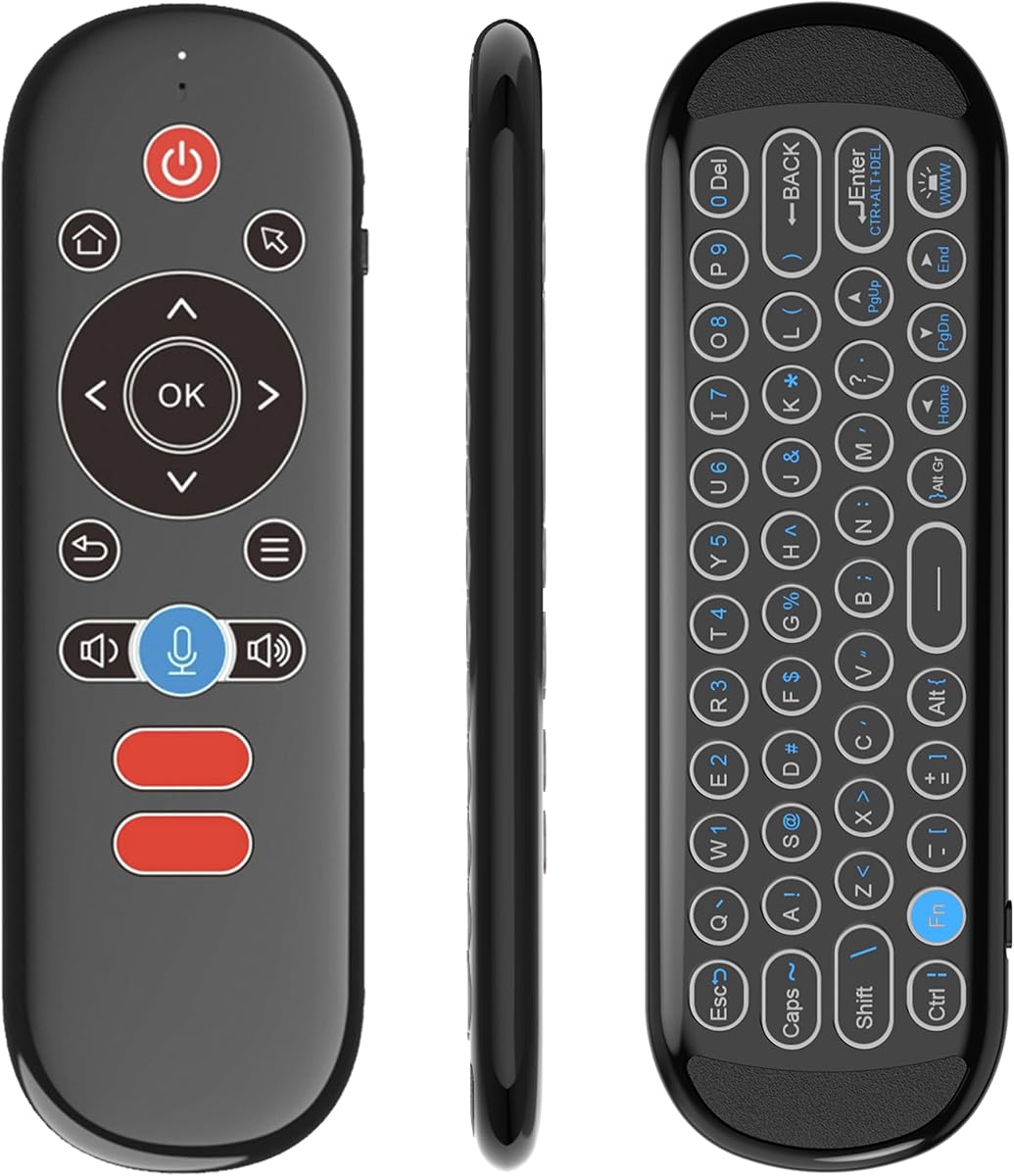
The Dual-Mode Backlit Remote is the most premium-styled controller in this roundup, combining a six-axis air mouse, dual-sided rechargeable mini keyboard, voice control, seven-color illumination, and Bluetooth and 2.4GHz connections. Its 4.3 rating makes it an attractive option for users who spend substantial time searching, navigating, and typing.
We may earn a commission when you buy through this link, at no additional cost to you.
The standout feature is the illuminated QWERTY keyboard. Seven selectable backlight colors improve visibility in a dark room, while the dual-sided design places navigation on one face and typing controls on the other. A three-axis gyroscope and three-axis accelerometer support smooth pointer movement, and a nano receiver enables plug-and-play 2.4GHz operation.
Its compatibility list is broad, including Android TV, Fire TV, Shield TV, Windows, macOS, Linux, projectors, HTPCs, Xbox media use, Raspberry Pi, and Kodi boxes. However, universal compatibility claims should still be checked against the exact device and operating mode. Voice functionality depends on what the connected platform and applications support, and IR learning requires an initial programming process.
This remote makes the most sense for households seeking one polished controller that handles navigation, typing, voice commands, and television functions. Its rechargeable design and backlit keyboard distinguish it from simpler budget models. It is our best premium pick for a feature-rich Android TV Box setup.
The QWERTY keyboard's adjustable illumination makes short searches and account entry much easier in low light. Rather than relying on an onscreen keyboard, users can cycle through backlight colors or turn the lighting off as needed.
Navigation and typing functions occupy separate sides of the remote. This arrangement keeps the controller compact while allowing the keyboard to remain useful without forcing every key onto the same crowded face.
We may earn a commission when you buy through this link, at no additional cost to you.
The EASYTONE Air Mouse Remote combines a 2.4GHz pointer, voice remote, and infrared learning in a 17-key layout. Its 3.8 rating reflects a functional approach to Android TV Box control, with support for smart TVs, mini PCs, HTPCs, laptops, projectors, and major desktop operating systems.
We may earn a commission when you buy through this link, at no additional cost to you.
The six-axis gyroscope translates hand and wrist movement into cursor motion, allowing more natural navigation than a conventional directional pad. Voice input can enter words within the system's built-in voice search field or supported apps. The included USB receiver works without installing drivers, making initial setup relatively uncomplicated.
The primary weakness is that voice search cannot cross applications, which means some commands may not work inside every streaming service. It also lacks the dual-mode flexibility and full learning functions found in newer premium remotes. Some buttons may perform differently across varying devices, so compatibility should be verified before replacing an original controller.
For a user who wants voice, infrared, and pointer functions in a straightforward package, the EASYTONE remains a practical option. It is best suited to Android boxes with USB receiver support and owners who do not need Bluetooth pairing or an extensive programmable button set.
The air pointer is ideal for graphical interfaces, while the traditional buttons handle volume, page movement, and mouse actions. IR learning and voice input add further ways to manage compatible equipment without reaching for a separate controller.
Plugging in the USB receiver avoids software installation and supports Linux, Android, Windows, and macOS environments. This makes the remote useful beyond an Android TV box when the receiving device supports a standard USB connection.
We may earn a commission when you buy through this link, at no additional cost to you.
The iPazzPort Mini Air Mouse Remote Keyboard is a compact dual-mode controller designed for Android TV boxes, laptops, PCs, projectors, and other compatible systems. Its 3.7 rating places it among the lower-rated options, but the rechargeable design, colorful keyboard, and flexible connections provide distinct value.
We may earn a commission when you buy through this link, at no additional cost to you.
Bluetooth and 2.4GHz modes allow more than one way to connect, while a six-axis gyroscope controls the cursor with natural wrist movements. The seven-color keyboard backlight is useful in a dark room and can be cycled or disabled using the stated Fn plus Space combination. Type-C recharging helps avoid routine battery replacement.
The biggest limitation is IR learning: only one button is available for learning, and the power function must be assigned to it before use. The product also warns of limited compatibility with devices using proprietary software, including some LG and Samsung televisions. Testing with a wired keyboard is recommended for those systems.
This model is best for a compact, rechargeable remote with an attractive keyboard and a preference for Bluetooth. It is less suitable if you need to control several television functions through infrared or operate platforms that rely on proprietary software. For standard AOSP-based Android boxes, its core pointer and keyboard functions remain compelling.
A built-in rechargeable battery removes the need for disposable cells during normal operation. The Type-C charging cable is not included, so you will need a compatible cable if one is not already available.
The small body is easy to hold and store, which can be helpful in a living room where a larger remote is inconvenient. Its dual-sided design preserves typing access without making the overall package excessively large.
We may earn a commission when you buy through this link, at no additional cost to you.
The Rii MX3 is a conventional 2.4GHz fly mouse with a mini keyboard, six-axis motion sensing, and infrared learning for up to five keys. Its 4.0 rating makes it a balanced option for Android smart TVs, IPTV systems, network set-top boxes, projectors, mini PCs, HTPCs, and Windows environments.
We may earn a commission when you buy through this link, at no additional cost to you.
The receiver plugs into a USB port, and pairing completes when the cursor appears and moves. Its three-gyro and three-sensor motion system can operate in horizontal or vertical orientation, which is useful for pointing and supported motion games. The stated transmission distance reaches ten meters, although real performance can vary with the environment.
Infrared learning is restricted to the power key and four colored buttons. The original television remote must support the NEC protocol for learning to work. As a universal controller, some buttons may not be applicable to every device, so it should not be assumed to replace every original remote.
The Rii MX3 is a solid choice for users who prefer the established MX3 fly-mouse format and want straightforward navigation without Bluetooth complexity. Its combination of a keyboard, pointer, and limited TV learning is useful for a basic Android TV Box arrangement where the main goal is faster menu operation.
The motion system supports directional pointer movement in both horizontal and vertical orientations. This flexibility helps users point from a comfortable position and can also serve compatible somatosensory games.
Most pairing occurs by inserting the enclosed dongle and watching for the cursor to move. If pairing does not begin automatically, the instructions advise holding the OK and TV buttons together.
We may earn a commission when you buy through this link, at no additional cost to you.
The MX3 Pro Backlit Remote combines an MX3-style air mouse, double-sided mini keyboard, and five-key infrared learning system. Its 3.9 rating reflects an established design for Android TV boxes, projectors, HTPCs, Raspberry Pi systems, and computers running Windows, macOS, Linux, or Android.
We may earn a commission when you buy through this link, at no additional cost to you.
The dual-sided body provides a 38-key keyboard with an Alt function for changing characters. LED backlighting improves visibility in dark rooms, while the three-gyro and three-sensor motion array supports cursor movement and compatible motion games. A 2.4GHz receiver provides a stated range of up to ten meters, depending on environmental conditions.
Its universal compatibility should not be interpreted literally. The listing specifically warns that it is not compatible with most Samsung, Sony, LG, TCL, and Roku televisions or with Roku devices. Only five keys can learn infrared commands, and the product does not include two AAA batteries. Voice control and Bluetooth are also absent.
This model is most appropriate for a user who values the traditional MX3 layout and wants a backlit typing surface without moving to a larger premium controller. It is a solid Android TV Box remote for standard AOSP systems, provided your television relies on a compatible connection method.
The keyboard's lighting makes short text entry possible in dim rooms without requiring a voice assistant. Its 38-key arrangement remains compact, and the Alt key switches between letters and punctuation.
Windows, macOS, Linux, and Android support makes the controller useful for HTPC and desktop tasks as well as television boxes. The USB receiver's broad operating-system support improves its value for mixed-device households.
We may earn a commission when you buy through this link, at no additional cost to you.
The Replacement G20S PRO is a single-sided Bluetooth and 2.4GHz voice air mouse designed for Android TV boxes and smart TVs. No customer rating is supplied for this listing, so its assessment rests on the stated design, motion algorithm, and connection features rather than a numerical feedback score.
We may earn a commission when you buy through this link, at no additional cost to you.
Its gyroscope core compensation algorithm is intended to identify movement and reduce unwanted tremor or shake. The straightforward single-sided layout places permanent buttons in a familiar arrangement, while dual-mode wireless connectivity gives users access to both the USB receiver and Android Bluetooth pairing.
Bluetooth setup requires disconnecting the USB receiver and holding the OK and Back buttons together for three to five seconds. The manufacturer specifies that Bluetooth mode currently supports Android systems only. Detailed information about IR learning, keyboard functionality, infrared range, and battery requirements is not provided in the supplied product data.
This remote is best for users who prioritize a clean layout and reliable motion control over an extensive feature list. It may be a particularly good fit for an Android-centric setup. Buyers should check the live listing for battery, voice, and accessory details before purchase.
The single-sided form avoids the need to flip the remote between navigation and typing surfaces. That can make it more approachable for users who want a conventional remote shape with an air pointer built in.
The advertised gyroscope compensation algorithm is intended to recognize deliberate gestures while reducing minor hand tremors. This should be especially relevant in long viewing sessions where precise selection becomes tiring.
We may earn a commission when you buy through this link, at no additional cost to you.
The Rock&Rown MX3 Pro is a 2.4GHz Android box remote with a six-axis somatosensory sensor, mini wireless keyboard, and five-key learning function. Its 4.0 rating makes it a solid alternative for IPTV systems, projectors, HTPCs, Xbox use, Raspberry Pi, and other compatible Android or computer devices.
We may earn a commission when you buy through this link, at no additional cost to you.
The remote supports both keyboard entry and air pointer navigation. Its three-gyro and three-sensor arrangement allows cursor movement in horizontal or vertical positions, which helps when selecting movies, programs, and menu items. Plug-and-play operation through the USB receiver keeps setup simple, and five keys can learn commands from an original television remote.
A key limitation is power control. If you want the remote to turn the television or Android box on and off, the power key must first learn the command from the original infrared remote. It also lacks voice control and Bluetooth, making it less versatile than the dual-mode BOXPUT and backlit premium models.
For people seeking a familiar MX3-style design with solid pointer navigation and basic learning, the Rock&Rown is a practical final recommendation. It is particularly useful when your goal is to simplify navigation and searching on an Android box without paying for additional wireless modes or voice features.
The motion sensors support multiple pointing orientations, making the controller usable whether it is held upright or angled. This flexibility helps reduce the precision required to select small onscreen items.
Infrared learning can combine the Android box and television under one controller, but power control must be programmed first. Checking this step before discarding the original remote ensures a smooth transition.
We may earn a commission when you buy through this link, at no additional cost to you.
The right air mouse depends on your box's operating system, available ports, preferred text-entry method, and need to control a television through infrared. These factors help separate simple pointer remotes from versatile universal controllers.
Verify compatibility before buying, especially when replacing a manufacturer-specific remote.
Choose 2.4GHz for broad USB support or Bluetooth for a receiver-free, compatible setup.
Prioritize a six-axis sensor and comfortable button placement for accurate selection.
Choose a backlit keyboard for manual entry or voice control for supported searches.
More learning keys mean fewer television functions left on the original remote.
Compare power logistics, including included batteries, cables, and charging requirements.
Confirm both platform and app support before choosing voice as a primary control method.
Prioritize reliable everyday controls over features you will never configure or use.
Begin by confirming that your Android device accepts a USB receiver or supports the required Bluetooth pairing method. For a 2.4GHz model, insert the receiver into an available USB port, power on the remote, and follow its pairing instructions. Once the pointer appears, practice moving it slowly across the screen before attempting detailed selections or typing.
Set up infrared learning before putting away the original television remote. Put the new remote and source remote close together, select the command to learn, and press the corresponding source button as directed. Test power, volume, and other frequently used functions from your normal seating position. For remotes with standard and PC firmware, switch modes only when needed and repeat the same procedure to return to standard mode.
Keep the air mouse clean and dry, and avoid pointing the motion sensor at direct sunlight or strong reflections. Charge rechargeable models with the specified port and replace batteries on a regular schedule if the cursor becomes erratic. Handle infrared learning carefully, and consult the current product instructions for firmware updates, pairing resets, and device-specific troubleshooting.
An air mouse moves an onscreen pointer by detecting changes in the controller's orientation. A standard remote usually moves selection through directional buttons. The pointer can be faster for graphical menus, scrolling, and selecting small icons, while directional buttons remain useful for predictable navigation and playback controls.
No, many Android TV Box remotes use a 2.4GHz USB receiver and work without Bluetooth. Bluetooth is useful when your box supports remote pairing and you want to avoid occupying a USB port. Check the box's documentation and the remote's compatibility notes before choosing a Bluetooth-only or dual-mode model.
It can if the model supports infrared learning and your television responds to compatible infrared commands. The remote usually continues operating the Android box through its wireless receiver while sending power, volume, or selected television commands through infrared. Basic models commonly learn five keys, whereas premium models may learn all buttons.
Voice control depends on the Android system, connected device, and individual application. A remote can provide microphone input, but an app must support the relevant search action. Voice features may also differ between Bluetooth and 2.4GHz modes, so check both the platform requirements and the apps you use most often.
No. Some streaming sticks use proprietary remote protocols that standard air mice cannot replace. The products in this guide have different exclusions, including certain Fire Stick, ROKU, MAG, DVB, Apple TV, and smart TV models. Confirm the exact device and operating system before purchasing.
The remote may need to be reoriented because motion controls can behave differently depending on how the device interprets wrist movement. Move the remote slowly and try the horizontal or vertical orientation specified in its instructions. Firmware updates may also be recommended for certain computer or Android configurations.
They are better for quick searches, short passwords, and occasional text entry than for lengthy documents. A compact layout reduces travel distance but provides fewer keys and a smaller typing surface. Voice input can be faster when the connected application properly supports it.
Try another USB port, reconnect the receiver, and repeat the pairing procedure. Some models require holding particular buttons together to enter pairing mode. Also confirm that the box supports USB input devices and that the remote has sufficient charge or fresh batteries. Firmware updates can resolve some Android and PC recognition issues.
The BOXPUT BPR2S Plus stands out as the strongest all-around option, combining the highest stated rating with full-button IR learning, dual wireless modes, gyroscopic pointing, and voice support. The Dual-Mode Backlit Remote is the premium choice for users who prioritize a rechargeable, illuminated keyboard, while the Air Mouse Remote MX3 Pro provides the most economical route to essential pointer, keyboard, and learning functions.
Your device should determine the final choice more than any feature checklist. A standard 2.4GHz receiver remote may be all an AOSP Android box needs, whereas Bluetooth, voice input, full infrared learning, or a backlit keyboard only matter when your television and streaming applications support them. Confirm exclusions before buying and learn the power command while the original remote remains available.
Finally, confirm the current listing, included accessories, battery requirements, and compatibility details before ordering. Customer ratings, device firmware, application support, prices, and availability can change over time. A remote that matches your exact box and viewing habits will deliver a more useful experience than one carrying a long list of unsupported features.